> ## Documentation Index
> Fetch the complete documentation index at: https://developers.pleo.io/llms.txt
> Use this file to discover all available pages before exploring further.
# How to Connect Pleo to a Custom API Integration
export const WhatComesNext = ({children, href}) => ;
This how-to explains how to connect Pleo to a Custom API Integration so that export jobs are routed to your integration.
## Prerequisites
Before you begin:
* You have access to the Pleo Web App
* You are logged in as an **Admin** or **Bookkeeper**
## Steps
### 1. Open Accounting Settings
Go to **Settings** and select **Accounting**.
### 2. Disconnect any existing integration
If you have an existing accounting integration connected, disconnect it before proceeding. You will see an option to disconnect on the current integration's settings.
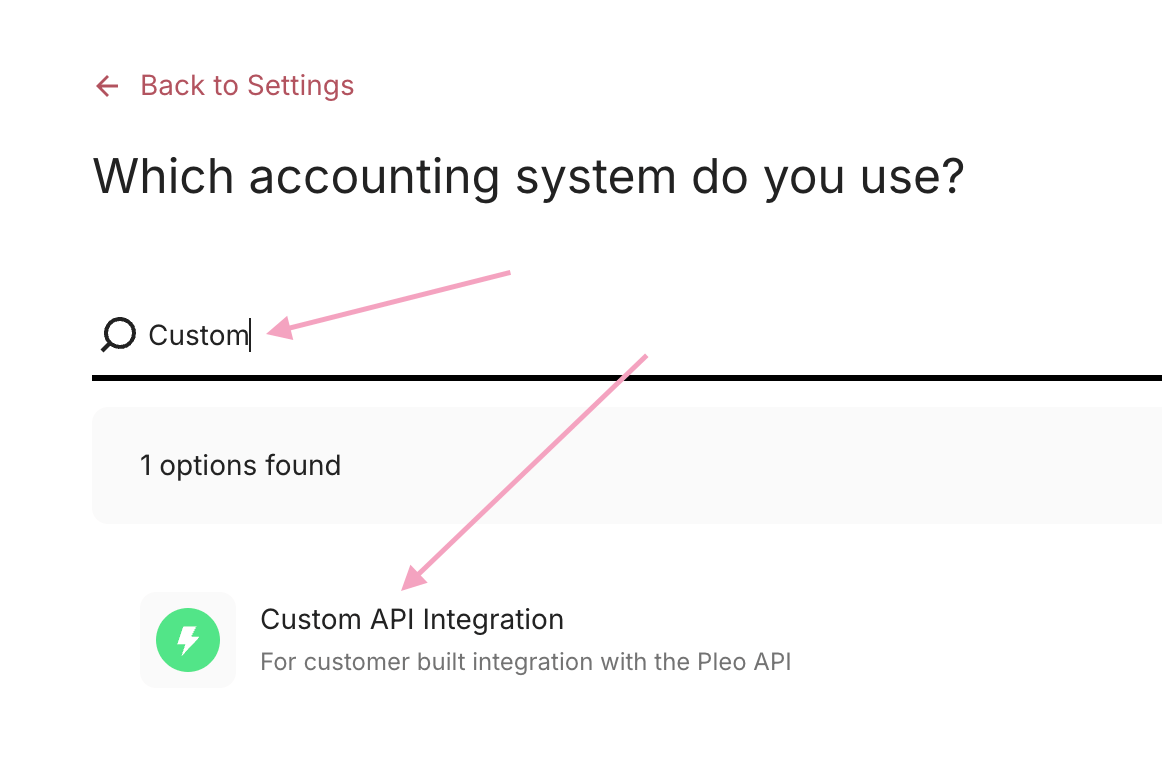
### 3. Search for Custom API Integration
In the search box, search for **Custom API Integration** and select it from the results.
## Result
Pleo is now connected to your custom integration and will route exports accordingly.
***
## What Comes Next?
How to Queue Export Items in Pleo's Web App
***
## Related Reading
* [Export Integration Workflow Guide](/docs/current/guides/export-integration-workflow-guide)
* [Connection and Authorisation Overview](/docs/current/integration-design/auth/integration-design-auth-overview)