> ## Documentation Index
> Fetch the complete documentation index at: https://developers.pleo.io/llms.txt
> Use this file to discover all available pages before exploring further.
# How to Resolve MISSING_CONTRA_ACCOUNTS
export const RememberCallout = ({title, children, icon = "🪢"}) =>
{icon}
{title &&
{title}
}
{children}
;
export const NoteCallout = ({title, children, icon = "💡"}) =>
{icon}
{title &&
{title}
}
{children}
;
This article explains why the `MISSING_CONTRA_ACCOUNTS` error occurs when calling `/v3/export-items` and how to resolve it.
## The Error
When calling `GET /v3/export-items`, you may receive the following response:
```json theme={null}
{
"type": "MISSING_CONTRA_ACCOUNTS",
"message": "Make sure you don't export GBP expenses before you set your contra accounts."
}
```
## Why This Happens
Export API v3 requires a contra account to be configured for each entity's default currency. The default currency is determined by the region where the company entity is registered, for example, GBP for a UK entity or
DKK for a Danish entity.
In a multi-entity setup, each entity has its own default currency, and a contra account must be configured for each one. If any entity's default currency does not have a contra account mapped, calls to `/v3/export-items` will fail with
this error.
## How to Resolve It
### Add a Contra Account
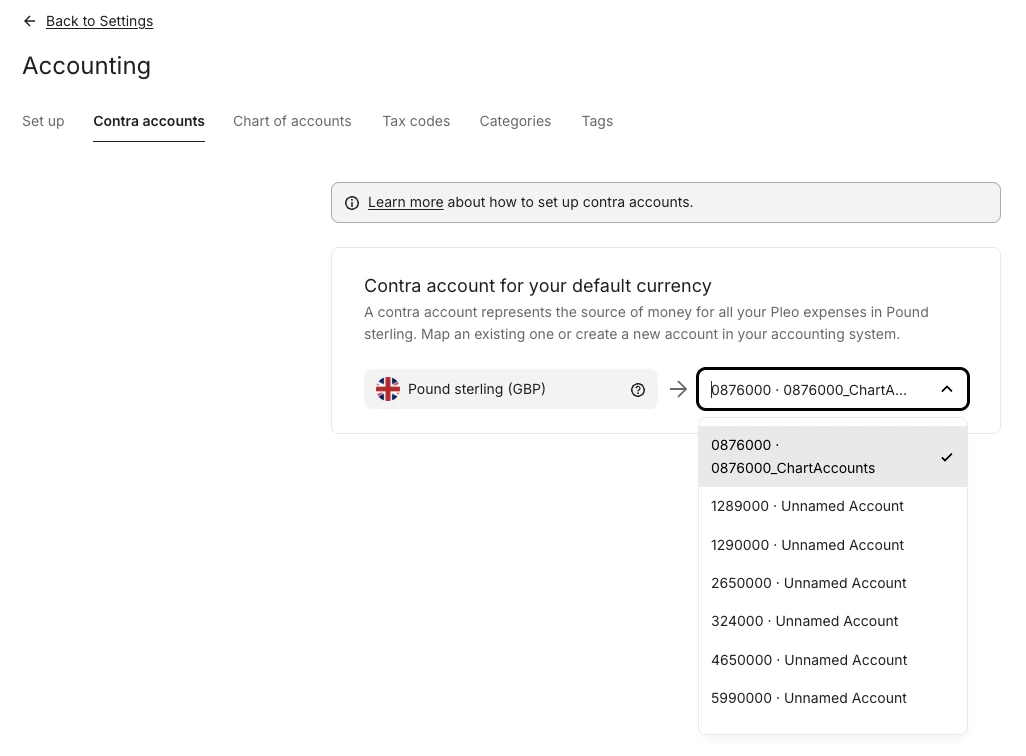
1. Click **Settings** from the main left-hand menu
2. Click **Accounting**
3. Click the **Contra accounts** tab
4. Select a Contra account for your default currency from the drop-down menu
A contra account must be configured for every default currency in use. Expenses in a
currency without a mapped contra account will continue to return this error.
### Contra Accounts tab not visible?
If you do not see the **Contra Accounts** tab, [contact Pleo Support](https://help.pleo.io/en/support/home) to have it enabled for your account.
## After Resolving
Once contra accounts are configured for the default currency, calls to `GET /v3/export-items` will return the full export item payload as expected.
***
## Related Reading
* [Fetch Export Item Data](/docs/current/integration-design/exports/integration-design-exports-fetch-export-items-data-layer)
* [How to Fetch Export Item Data for Processing](/docs/current/how-tos/accounting-integrations/how-to-fetch-export-item-data-for-as-erp-processing)
***