> ## Documentation Index
> Fetch the complete documentation index at: https://developers.pleo.io/llms.txt
> Use this file to discover all available pages before exploring further.
# How to Sync Accounts
export const FetchAndMatchAccountsDiagram = () => {
const diagram = `
%%{init: {"themeVariables": {"fontSize": "20px"}}}%%
flowchart LR
S1["1. Fetch Active Accounts from AS"] --> S2["2. Fetch All Accounts from Pleo"] --> S3["3. Match by externalId"] --> S4["Create, Update,\nand Archive Accounts"]
click S1 "#1-retrieve-active-accounts-from-the-accounting-system"
click S2 "#2-retrieve-all-accounts-from-pleo"
click S3 "#3-match-as-accounts-to-pleo-accounts-by-externalid"
style S1 white-space:normal
style S2 white-space:normal
style S3 white-space:normal
style S4 white-space:normal,stroke-dasharray:5 5
`;
return ;
};
export const CoASyncWorkflowDiagramTopNav = ({highlight}) => {
const highlightStyle = highlight ? `style ${highlight} stroke:#f63b92,stroke-width:3px` : "";
const diagram = `
%%{init: {"themeVariables": {"fontSize": "14px"}}}%%
flowchart LR
subgraph AS["Accounting System"]
source["Chart of Accounts"]
end
subgraph Pleo["Pleo APIs"]
A["1. Fetch and Match Accounts"]
B["2. Create, Update, and Archive Accounts"]
A --> B
end
source --> A
click A "/docs/current/how-tos/accounting-integrations/imports/accounts/how-to-sync-accounts"
click B "/docs/current/how-tos/accounting-integrations/imports/accounts/how-to-create-update-archive-accounts"
style A white-space:normal
style B white-space:normal
style source white-space:normal
style AS fill:none,stroke:#000000
style Pleo fill:none,stroke:#000000
${highlightStyle}
`;
return ;
};
export const WhatComesNext = ({children, href}) => ;
export const RememberCallout = ({title, children, icon = "🪢"}) =>
{icon}
{title &&
{title}
}
{children}
;
This how-to covers the fetch and match phase of Chart of Accounts Sync: retrieving accounts from the Accounting System and Pleo, then determining what action is needed for each. For the write operations, see [How to Create, Update, and Archive Accounts](/docs/current/how-tos/accounting-integrations/imports/accounts/how-to-create-update-archive-accounts).
Your integration must:
* Retrieve active accounts from the AS
* Retrieve all Accounts (active and archived) from Pleo
* Match AS accounts to Pleo Accounts by `externalId` to determine what action is needed
## Prerequisites
Before you begin:
* You're familiar with the [Chart of Accounts Sync Overview](/docs/current/integration-design/accounting-integrations/imports/accounts/integration-design-accounts-overview) and the [Integration Design for Syncing Accounts](/docs/current/integration-design/accounting-integrations/imports/accounts/integration-design-accounts-sync)
* Your integration is authenticated using one of the [supported authentication methods](/docs/current/integration-design/auth/integration-design-auth-overview#authentication-policy-overview)
* Your integration can call Pleo's Chart of Accounts API endpoints
## Scenario
This how-to uses a consistent example to illustrate each step. The table below shows the starting state in both systems before this sync runs.
| Account (AS) | externalId | AS Status | Account (Pleo) | Pleo Status |
| ---------------------- | ---------- | --------- | ---------------------- | -------------- |
| 1000 - Office Supplies | ext-1000 | Active | 1000 - Office Supplies | Active |
| 2000 - Travel | ext-2000 | Active | 2000 - Travel | Archived |
| 3000 - Software | ext-3000 | Active | — | Does not exist |
| 4000 - Marketing | ext-4000 | Active | 4000 - Advertising | Active |
| — | 5000 | — | 5000 - Entertainment | Active |
## Steps
### 1. Retrieve Active Accounts from the Accounting System
Fetch all active accounts from the Chart of Accounts in the AS.
**Example Pseudo:**
```pseudo theme={null}
activeASAccounts = fetchActiveAccountsFromAS()
```
#### Example Result
| Account | externalId | AS Status |
| ---------------------- | ---------- | --------- |
| 1000 - Office Supplies | ext-1000 | Active |
| 2000 - Travel | ext-2000 | Active |
| 3000 - Software | ext-3000 | Active |
| 4000 - Marketing | ext-4000 | Active |
***
### 2. Retrieve All Accounts from Pleo
**API Endpoint**: POST [`/v1/chart-of-accounts:search`](/reference/accounts/fetch-a-list-of-accounts)
**Example parameters:**
* companyId: `12abc3d4-e567-890e-1234-abc56e78fabc`
* includeArchived: `true`
Fetch both active and archived Accounts from Pleo. Including archived Accounts allows unarchiving rather than creating duplicates.
**Example Pseudo:**
```pseudo theme={null}
pleoAccounts = fetchAccountsFromPleo(includeArchived: true)
```
#### Example Request
```bash theme={null}
curl -X POST "https://external.staging.pleo.io/v1/chart-of-accounts:search" \
-H "Authorization: Bearer " \
-H "Content-Type: application/json" \
-d '{
"companyId": "12abc3d4-e567-890e-1234-abc56e78fabc",
"includeArchived": true
}'
```
```bash theme={null}
curl --request POST \
-u "pls_1ab2cd3e4f5g6h7a89b012c34de56f78_gabc90:" \
-H "Accept: application/json;charset=UTF-8" \
-H "Content-Type: application/json" \
"https://external.staging.pleo.io/v1/chart-of-accounts:search" \
-d '{
"companyId": "12abc3d4-e567-890e-1234-abc56e78fabc",
"includeArchived": true
}' \
| jq
```
#### Example Response
```json theme={null}
{
"data": [
{
"id": "7ea2006f-180e-4c52-a2bb-562d3a62fd48",
"companyId": "12abc3d4-e567-890e-1234-abc56e78fabc",
"code": "5000",
"externalId": "5000",
"name": "Entertainment",
"archived": false
},
{
"id": "a470bfbe-8046-4b43-a4d9-4f5796acdd93",
"companyId": "12abc3d4-e567-890e-1234-abc56e78fabc",
"code": "4000",
"externalId": "ext-4000",
"name": "Advertising",
"archived": false
},
{
"id": "d8371c2d-3f62-47df-a8d6-6a3ba6387e00",
"companyId": "12abc3d4-e567-890e-1234-abc56e78fabc",
"code": "2000",
"externalId": "ext-2000",
"name": "Travel",
"archived": true
},
{
"id": "77049275-e102-4ce4-84e5-c90852765fcd",
"companyId": "12abc3d4-e567-890e-1234-abc56e78fabc",
"code": "1000",
"externalId": "ext-1000",
"name": "Office Supplies",
"archived": false
}
],
"pagination": {
"hasPreviousPage": false,
"hasNextPage": false,
"currentRequestPagination": {
"sortingKeys": [],
"sortingOrder": [],
"parameters": {}
},
"startCursor": "AAAAAADKHEEOIDOJO34A=AAAAAADKHEEOIDOJO34A=P2RAA3YYBZGFFIV3KYWTUYX5JA",
"endCursor": "AAAAAADKCVM2UIAPLIEA=AAAAAADKHEETOMBB2K4A=BLNKLWE6ZBBDLLU24XGZ4GAFAI",
"total": 4
}
}
```
#### Example Result
| Account (Pleo) | externalId | Pleo Status |
| ---------------------- | ---------- | ----------- |
| 1000 - Office Supplies | ext-1000 | Active |
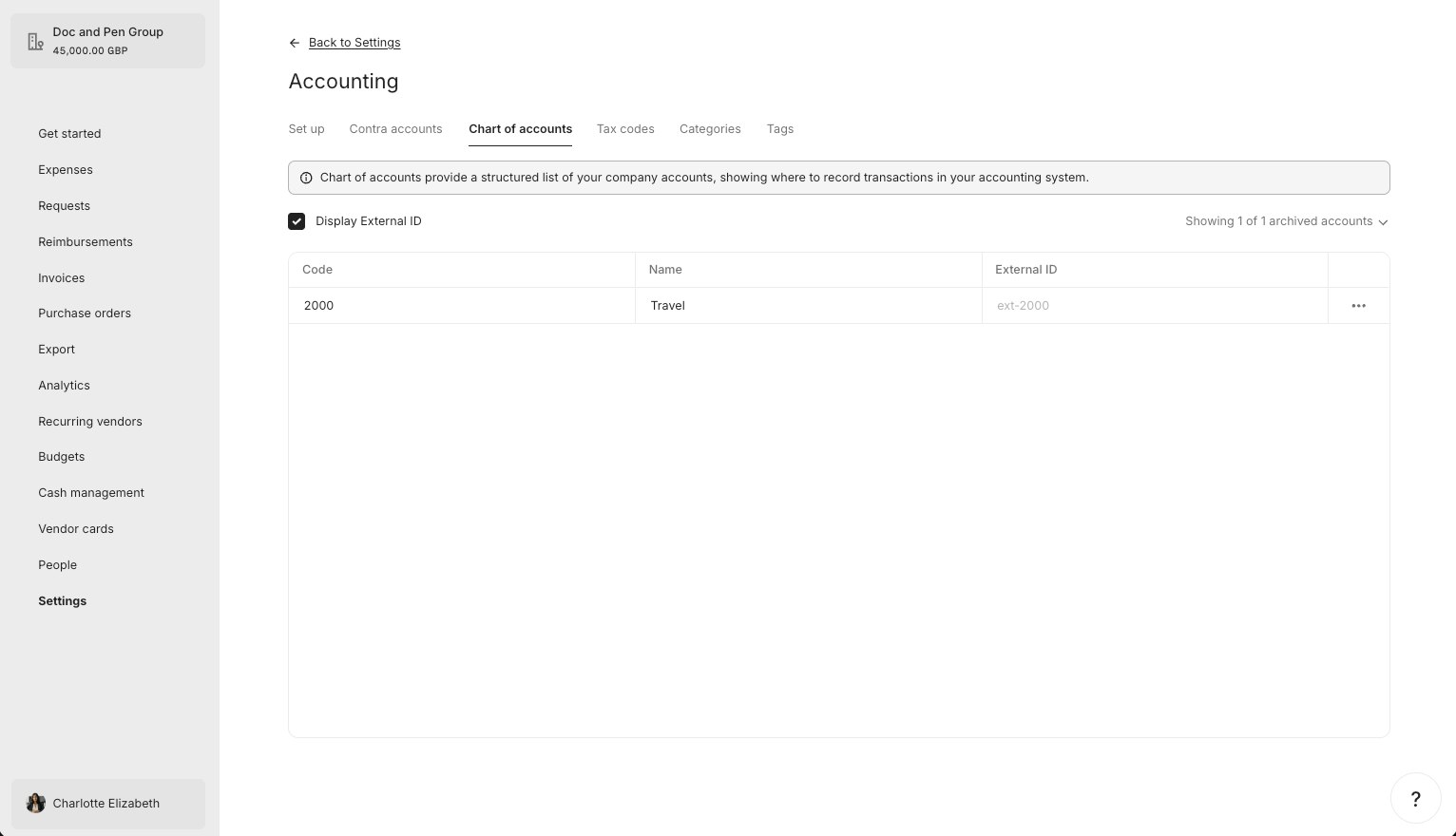
| 2000 - Travel | ext-2000 | Archived |
| 4000 - Advertising | ext-4000 | Active |
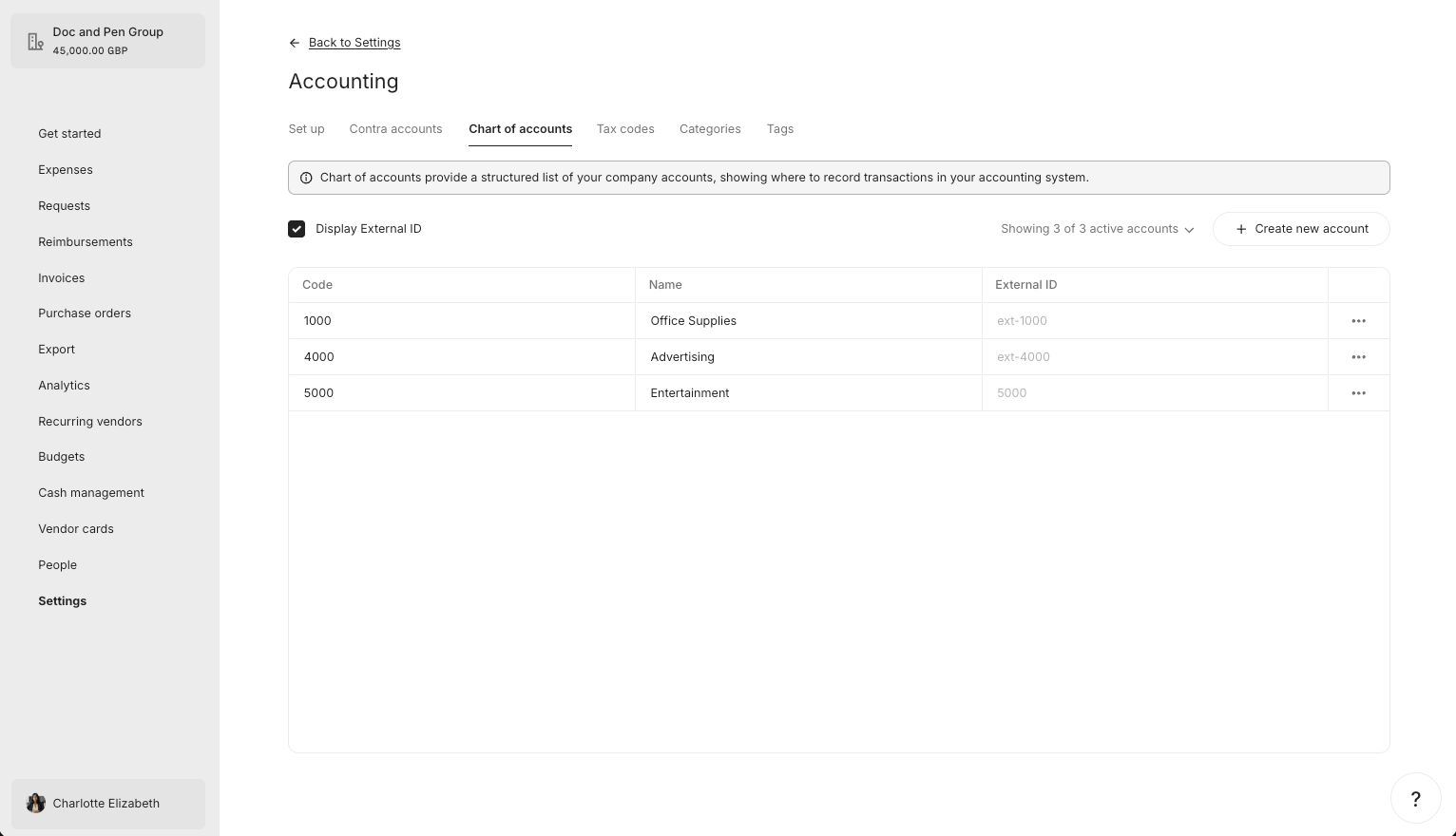
| 5000 - Entertainment | 5000 | Active |
#### What it looks like in Pleo Web App
***
### 3. Match AS Accounts to Pleo Accounts by externalId
For each active AS account, attempt to find a matching Account in Pleo using `externalId`.
**Example Pseudo:**
```pseudo theme={null}
pleoAccountsByExternalId = index pleoAccounts by externalId
for account in activeASAccounts:
matchedAccount = pleoAccountsByExternalId[account.externalId]
if matchedAccount is null:
createAccount(account)
else if matchedAccount.archived == true:
unarchiveAndUpdate(matchedAccount, account)
else if matchedAccount.name != account.name or matchedAccount.code != account.code:
updateAccount(matchedAccount, account)
// else: no action needed
```
#### Example Result
| AS Account | Pleo Account | Pleo Status | Action |
| ---------------------- | ---------------------- | --------------- | --------- |
| 1000 - Office Supplies | 1000 - Office Supplies | Active, matches | No action |
| 2000 - Travel | 2000 - Travel | Archived | Unarchive |
| 3000 - Software | — | Does not exist | Create |
| 4000 - Marketing | 4000 - Advertising | Active, differs | Update |
| — | 5000 - Entertainment | Active | Archive |
***
## What Comes Next?
How to Create, Update, and Archive Accounts
***
this how-to is part of:
***
## Related Reading
* [How to Create, Update, and Archive Accounts](/docs/current/how-tos/accounting-integrations/imports/accounts/how-to-create-update-archive-accounts)
* [Sync Accounts Integration Design](/docs/current/integration-design/accounting-integrations/imports/accounts/integration-design-accounts-sync)
* [Data Mapping](/docs/current/integration-design/accounting-integrations/imports/accounts/integration-design-accounts-data-mapping)
* [Platform Capabilities: Chart of Accounts Sync](/docs/current/platform/accounting-integrations/imports/accounts/accounts-sync-overview)
***