> ## Documentation Index
> Fetch the complete documentation index at: https://developers.pleo.io/llms.txt
> Use this file to discover all available pages before exploring further.
# How to Create, Update, and Archive Tax Codes
export const CreateUpdateArchiveTaxCodesDiagram = () => {
const diagram = `
%%{init: {"themeVariables": {"fontSize": "18px"}}}%%
flowchart LR
S1["1. Create Tax Codes for New AS Entries"] --> S2["2. Unarchive or Update Existing Tax Codes"] --> S3["3. Archive Tax Codes with No Matching AS Entry"] --> S4["4. Handle Duplicate Codes in Pleo"]
click S1 "#1-create-tax-codes-for-new-as-entries"
click S2 "#2-unarchive-or-update-existing-tax-codes"
click S3 "#3-archive-tax-codes-with-no-matching-as-entry"
click S4 "#4-handle-duplicate-codes-in-pleo"
style S1 white-space:normal
style S2 white-space:normal
style S3 white-space:normal
style S4 white-space:normal
`;
return ;
};
export const TaxSyncWorkflowDiagramTopNav = ({highlight}) => {
const highlightStyle = highlight ? `style ${highlight} stroke:#f63b92,stroke-width:3px` : "";
const diagram = `
%%{init: {"themeVariables": {"fontSize": "12px"}}}%%
flowchart LR
subgraph AS["Accounting System"]
source["Tax Codes"]
end
subgraph Pleo["Pleo APIs"]
A["1. Fetch and Match Tax Codes"]
B["2. Create, Update, and Archive Tax Codes"]
A --> B
end
source --> A
click A "/docs/current/how-tos/accounting-integrations/imports/tax-codes/how-to-fetch-and-match-tax-codes"
click B "/docs/current/how-tos/accounting-integrations/imports/tax-codes/how-to-create-update-archive-tax-codes"
style A white-space:normal
style B white-space:normal
style source white-space:normal
style AS fill:none,stroke:#000000
style Pleo fill:none,stroke:#000000
${highlightStyle}
`;
return ;
};
export const WhatComesNext = ({children, href}) => ;
export const NoteCallout = ({title, children, icon = "💡"}) =>
{icon}
{title &&
{title}
}
{children}
;
export const RememberCallout = ({title, children, icon = "🪢"}) =>
{icon}
{title &&
{title}
}
{children}
;
This how-to covers the write operations for Tax Sync: creating new Tax Codes, updating or unarchiving existing Tax Codes, and archiving Tax Codes that are no longer active in the Accounting System.
Run this after [How to Fetch and Match Tax Codes](/docs/current/how-tos/accounting-integrations/imports/tax-codes/how-to-fetch-and-match-tax-codes), which covers fetching and matching tax codes from both systems.
## Prerequisites
Before you begin:
* You have completed [How to Fetch and Match Tax Codes](/docs/current/how-tos/accounting-integrations/imports/tax-codes/how-to-fetch-and-match-tax-codes) and determined what action is needed for each tax code
* Your integration is authenticated using one of the [supported authentication methods](/docs/current/integration-design/auth/integration-design-auth-overview#authentication-policy-overview)
* Your integration can call Pleo's Tax Codes API endpoints
## Scenario
This how-to continues from the [How to Fetch and Match Tax Codes](/docs/current/how-tos/accounting-integrations/imports/tax-codes/how-to-fetch-and-match-tax-codes) scenario. After matching, the following actions are required:
| AS Tax Code | Pleo Tax Code | Action |
| ---------------------- | ---------------------- | --------- |
| VAT20 - Standard (20%) | VAT20 - Standard (20%) | No action |
| VAT5 - Reduced (5%) | VAT5 - Reduced (5%) | Unarchive |
| VAT0 - Zero Rated (0%) | — | Create |
| REV - Reverse Charge | REV - Reverse Charge | Update |
| — | EXEMPT - Exempt | Archive |
## Steps
### 1. Create Tax Codes for New AS Entries
**API Endpoint**: POST [`/v0/tax-codes`](/reference/tax-codes/create-a-new-tax-code)
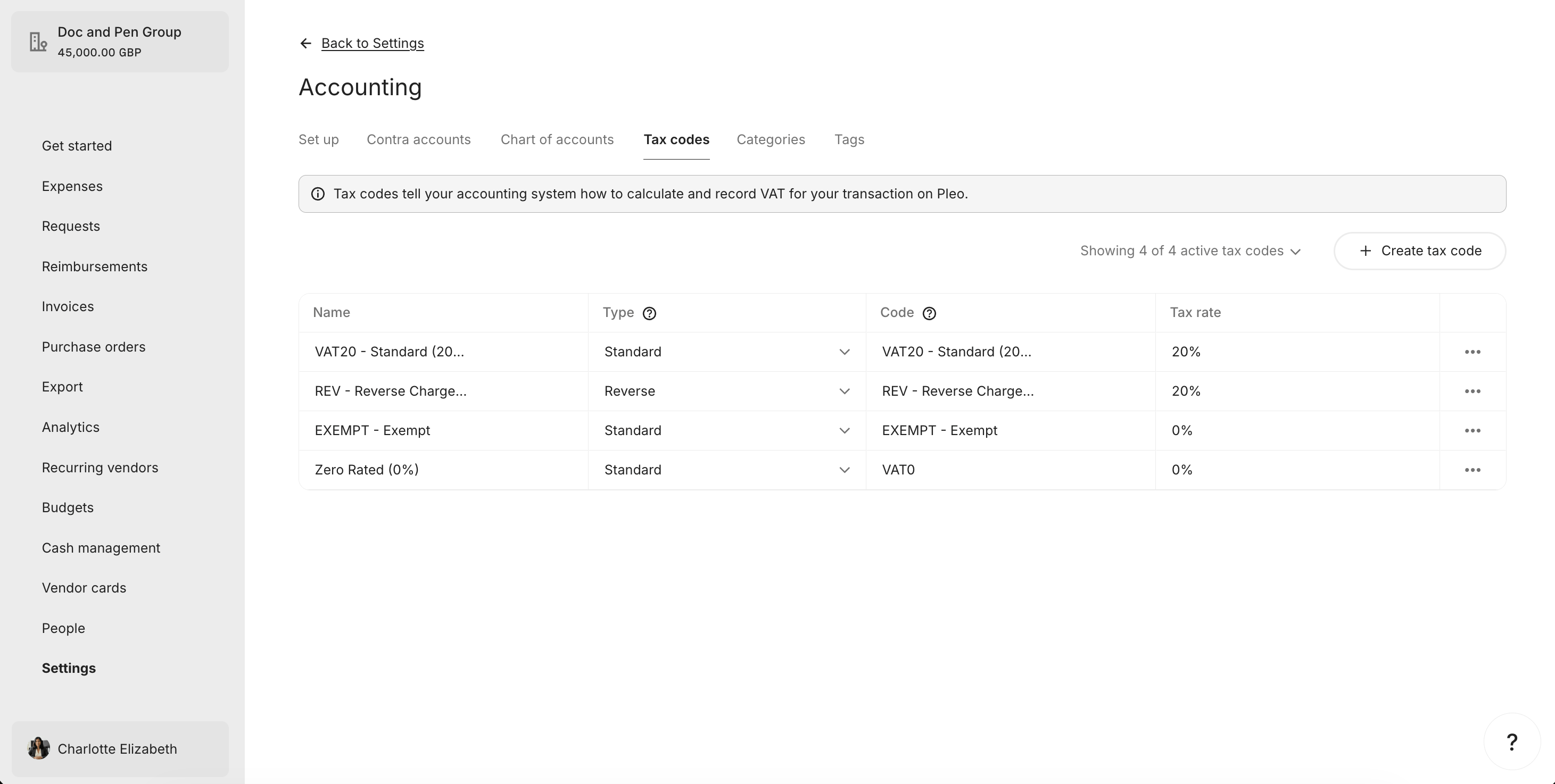
If an AS tax code has no matching Pleo Tax Code, create a new Tax Code.
**Example Pseudo:**
```pseudo theme={null}
if matchedTaxCode is null:
newTaxCode.code = taxCode.code
newTaxCode.name = taxCode.name
newTaxCode.rate = taxCode.rate
newTaxCode.type = mapType(taxCode) // "reverse" or "inclusive"
newTaxCode.archived = false
POST newTaxCode to Pleo
```
#### Type Mapping
| AS Tax Code | Pleo `type` |
| --------------- | ----------- |
| Reverse tax | `reverse` |
| All other taxes | `inclusive` |
The Pleo Web App labels these **Standard** and **Reverse**; see [Tax Sync Data Mapping](/docs/current/integration-design/accounting-integrations/imports/tax-codes/integration-design-tax-sync-data-mapping#tax-code-type-mapping) for the full naming note.
#### Example Request
```bash theme={null}
curl -X POST "https://external.staging.pleo.io/v0/tax-codes" \
-H "Authorization: Bearer " \
-H "Content-Type: application/json" \
-d '{
"companyId": "12abc3d4-e567-890e-1234-abc56e78fabc",
"code": "VAT0 - Zero Rated (0%)",
"name": "VAT0 - Zero Rated (0%)",
"rate": 0.00,
"type": "inclusive",
"archived": false
}'
```
```bash theme={null}
curl --request POST \
-u "pls_1ab2cd3e4f5g6h7a89b012c34de56f78_gabc90:" \
-H "Accept: application/json;charset=UTF-8" \
-H "Content-Type: application/json" \
"https://external.staging.pleo.io/v0/tax-codes" \
-d '{
"companyId": "12abc3d4-e567-890e-1234-abc56e78fabc",
"code": "VAT0 - Zero Rated (0%)",
"name": "VAT0 - Zero Rated (0%)",
"rate": 0.00,
"type": "inclusive",
"archived": false
}' \
| jq
```
#### Example Response
```json theme={null}
{
"data": {
"id": "4386a696-20d3-47fe-a230-9516fc93222c",
"companyId": "12abc3d4-e567-890e-1234-abc56e78fabc",
"name": "VAT0 - Zero Rated (0%)",
"code": "VAT0 - Zero Rated (0%)",
"type": "inclusive",
"rate": 0E-16,
"accountingIntegrationSystem": "pleo",
"archived": false,
"createdAt": "2026-07-07T10:11:25.715331584Z",
"updatedAt": "2026-07-07T10:11:25.715331584Z"
}
}
```
#### What it looks like in Pleo Web App
***
### 2. Unarchive or Update Existing Tax Codes
**API Endpoint**: PUT [`/v0/tax-codes/{taxCodeId}`](/reference/tax-codes/update-an-tax-code)
If a matching Tax Code is found:
* **AS tax code is active, Pleo Tax Code is archived:** Unarchive by setting `archived: false` and update name, rate, and type if they differ.
* **AS tax code is active, Pleo Tax Code details differ:** Update the Tax Code to match the AS.
* **AS tax code is active, Pleo Tax Code details match:** No action required.
**Example Pseudo:**
```pseudo theme={null}
if matchedTaxCode.archived == true:
matchedTaxCode.archived = false
matchedTaxCode.name = taxCode.name
matchedTaxCode.rate = taxCode.rate
matchedTaxCode.type = mapType(taxCode)
PUT matchedTaxCode to Pleo
else if detailsDiffer(matchedTaxCode, taxCode):
matchedTaxCode.name = taxCode.name
matchedTaxCode.rate = taxCode.rate
matchedTaxCode.type = mapType(taxCode)
PUT matchedTaxCode to Pleo
```
The `code` field represents your Accounting System's internal identifier for the tax code, and your integration should use it for matching. It should never be changed during an update. If a Pleo Tax Code matches on name or any other field but its `code` doesn't match any AS tax code, treat it as [code not found](/docs/current/integration-design/accounting-integrations/imports/tax-codes/integration-design-tax-sync#code-not-found) rather than a match: create a new Tax Code for the AS entry, and [archive the unmatched Pleo Tax Code](/docs/current/integration-design/accounting-integrations/imports/tax-codes/integration-design-tax-sync#4-archive-unmatched-tax-codes).
### Unarchive
#### Example Request
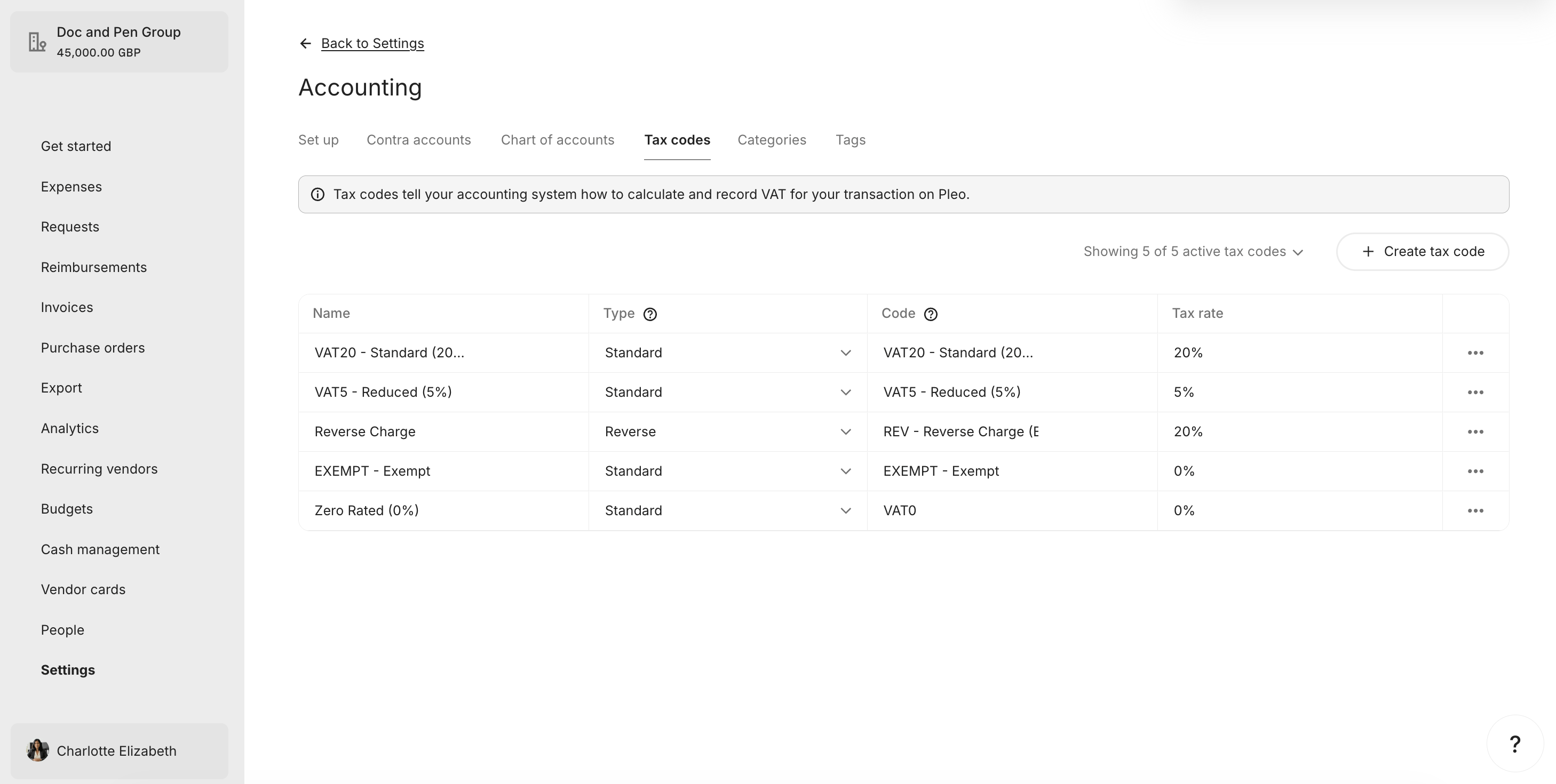
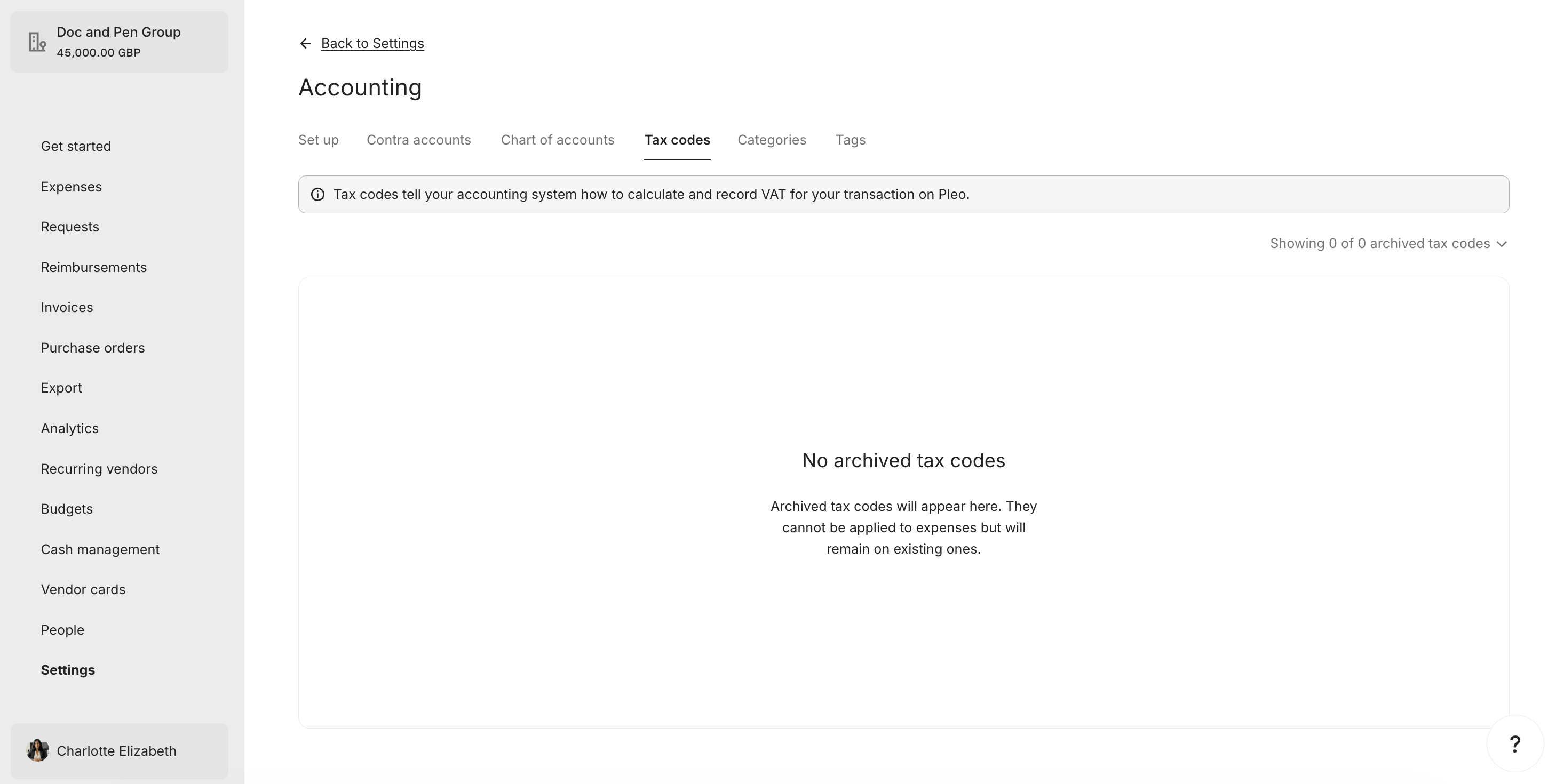
The "VAT5 - Reduced (5%)" Tax Code is unarchived in this example.
```bash theme={null}
curl -X PUT "https://external.staging.pleo.io/v0/tax-codes/c3d4e5f6-g789-012g-3456-cde78g90habc" \
-H "Authorization: Bearer " \
-H "Content-Type: application/json" \
-d '{
"companyId": "12abc3d4-e567-890e-1234-abc56e78fabc",
"code": "VAT5 - Reduced (5%)",
"name": "VAT5 - Reduced (5%)",
"rate": 0.05,
"type": "inclusive",
"archived": false
}'
```
```bash theme={null}
curl --request PUT \
-u "pls_1ab2cd3e4f5g6h7a89b012c34de56f78_gabc90:" \
-H "Accept: application/json;charset=UTF-8" \
-H "Content-Type: application/json" \
"https://external.staging.pleo.io/v0/tax-codes/c3d4e5f6-g789-012g-3456-cde78g90habc" \
-d '{
"companyId": "12abc3d4-e567-890e-1234-abc56e78fabc",
"code": "VAT5 - Reduced (5%)",
"name": "VAT5 - Reduced (5%)",
"rate": 0.05,
"type": "inclusive",
"archived": false
}' \
| jq
```
#### Example Response
```json theme={null}
{
"data": {
"id": "c3d4e5f6-g789-012g-3456-cde78g90habc",
"companyId": "12abc3d4-e567-890e-1234-abc56e78fabc",
"code": "VAT5 - Reduced (5%)",
"name": "VAT5 - Reduced (5%)",
"rate": 0.0500000000000000,
"type": "inclusive",
"archived": false,
"createdAt": "2026-07-07T08:47:59.430364Z",
"updatedAt": "2026-07-08T10:06:51.105888Z"
}
}
```
#### What it looks like in Pleo Web App
### Update
#### Example Request
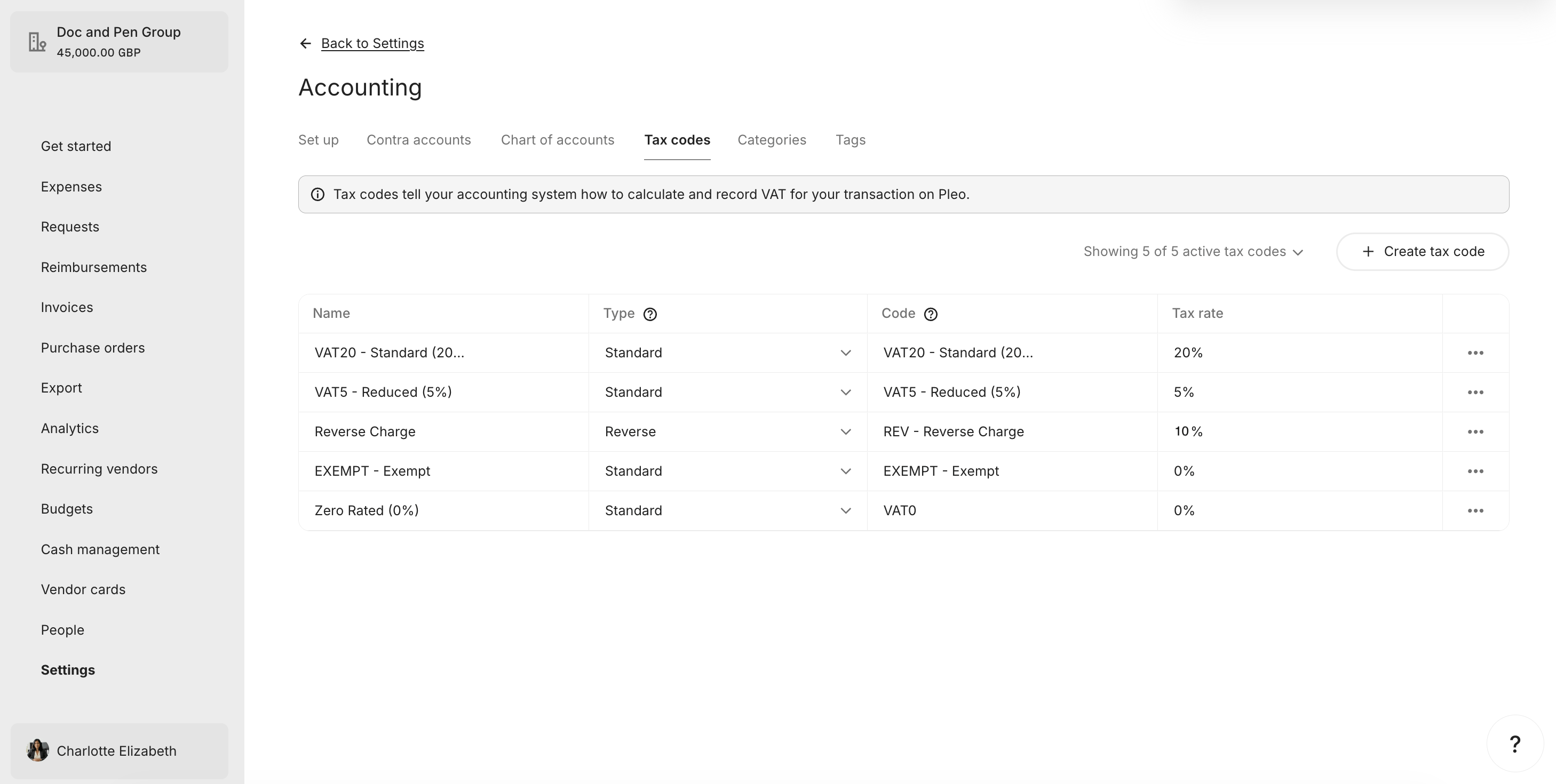
The "REV - Reverse Charge" Tax Code's rate is updated from 20% to match the AS rate of 10% in this example.
```bash theme={null}
curl -X PUT "https://external.staging.pleo.io/v0/tax-codes/b2c3d4e5-f678-901f-2345-bcd67f89gabc" \
-H "Authorization: Bearer " \
-H "Content-Type: application/json" \
-d '{
"companyId": "12abc3d4-e567-890e-1234-abc56e78fabc",
"code": "REV - Reverse Charge",
"name": "REV - Reverse Charge",
"rate": 0.10,
"type": "reverse",
"archived": false
}'
```
```bash theme={null}
curl --request PUT \
-u "pls_1ab2cd3e4f5g6h7a89b012c34de56f78_gabc90:" \
-H "Accept: application/json;charset=UTF-8" \
-H "Content-Type: application/json" \
"https://external.staging.pleo.io/v0/tax-codes/b2c3d4e5-f678-901f-2345-bcd67f89gabc" \
-d '{
"companyId": "12abc3d4-e567-890e-1234-abc56e78fabc",
"code": "REV - Reverse Charge",
"name": "REV - Reverse Charge",
"rate": 0.10,
"type": "reverse",
"archived": false
}' \
| jq
```
#### Example Response
```json theme={null}
{
"data": {
"id": "b2c3d4e5-f678-901f-2345-bcd67f89gabc",
"companyId": "12abc3d4-e567-890e-1234-abc56e78fabc",
"name": "REV - Reverse Charge",
"code": "REV - Reverse Charge",
"type": "reverse",
"rate": 0.1000000000000000,
"accountingIntegrationSystem": "pleo",
"archived": false,
"createdAt": "2026-07-07T08:48:52.799351Z",
"updatedAt": "2026-07-08T09:20:10.215202Z"
}
}
```
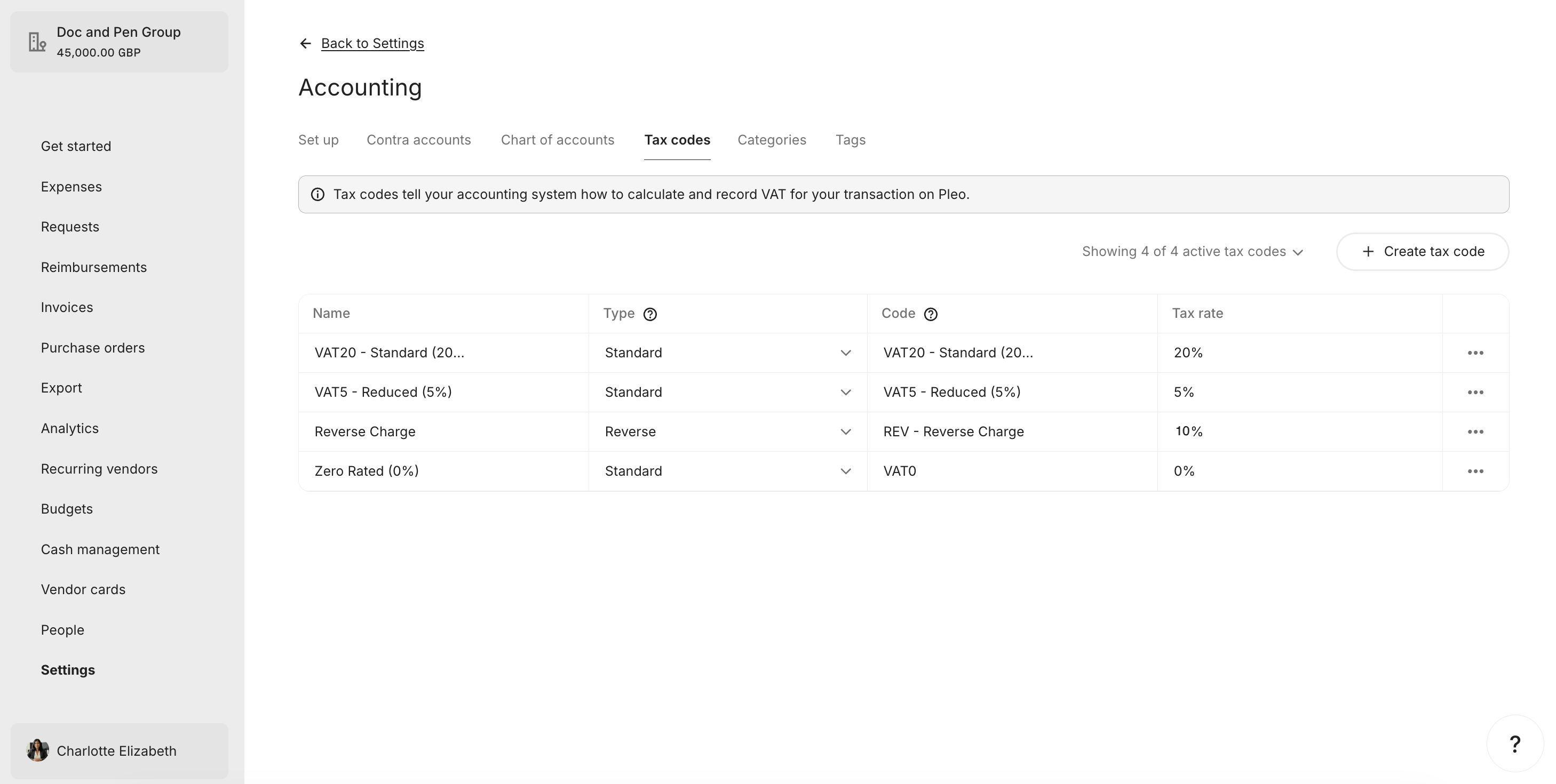
#### What it looks like in Pleo Web App
***
### 3. Archive Tax Codes with No Matching AS Entry
**API Endpoint**: PUT [`/v0/tax-codes/{taxCodeId}`](/reference/tax-codes/update-an-tax-code)
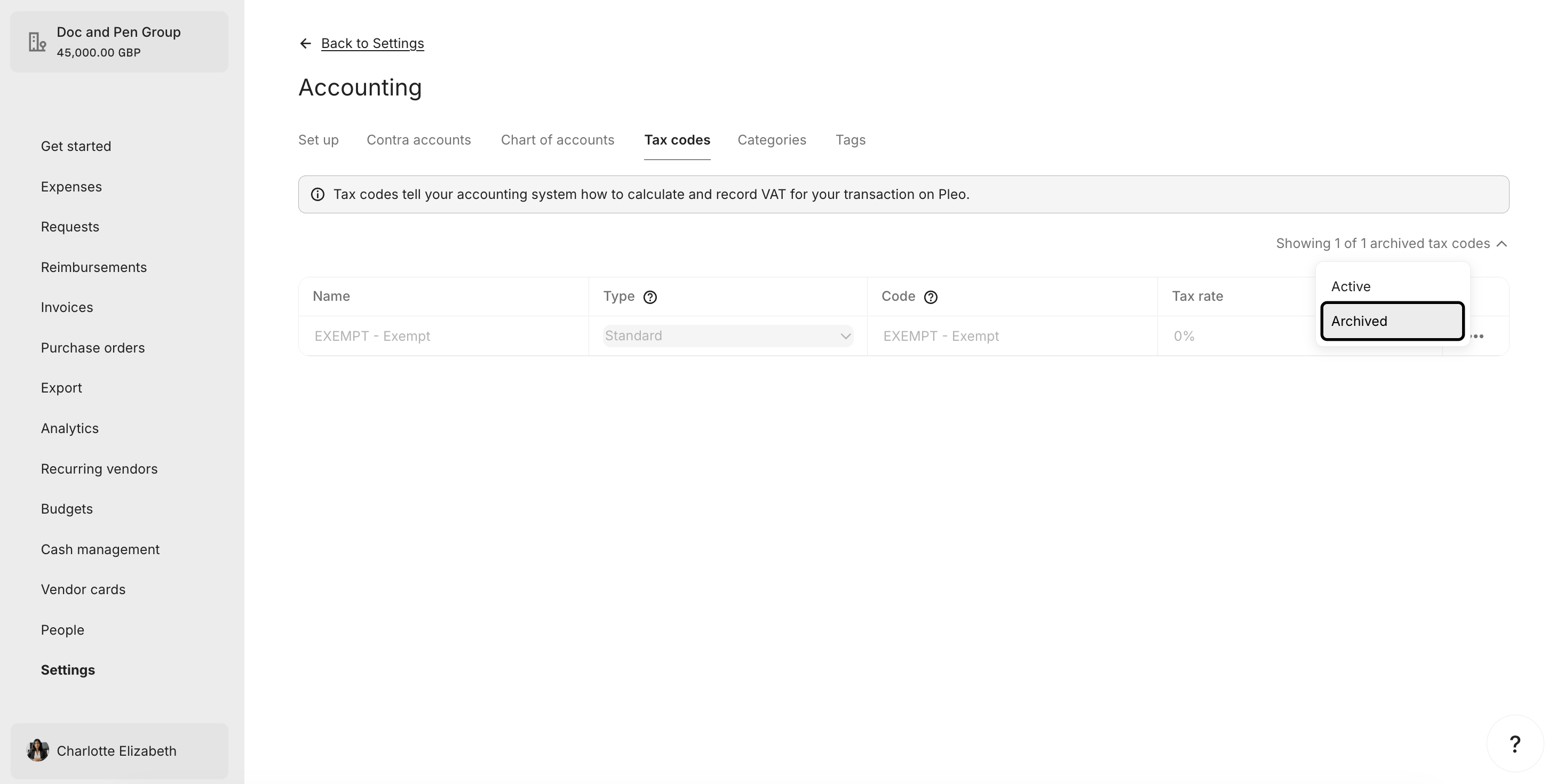
If a Pleo Tax Code is active but its corresponding AS tax code is no longer active (or does not exist), archive the Tax Code.
Do not delete Tax Codes. Archiving is non-destructive and reversible.
**Example Pseudo:**
```pseudo theme={null}
relevantASCodes = relevantASTaxCodes.map(tc => tc.code.toLowerCase())
for taxCode in pleoTaxCodes where archived == false:
if taxCode.code.toLowerCase() not in relevantASCodes:
taxCode.archived = true
PUT taxCode to Pleo
```
#### Example Request
```bash theme={null}
curl -X PUT "https://external.staging.pleo.io/v0/tax-codes/a1b2c3d4-e567-890e-1234-abc56e78fabc" \
-H "Authorization: Bearer " \
-H "Content-Type: application/json" \
-d '{
"companyId": "12abc3d4-e567-890e-1234-abc56e78fabc",
"code": "EXEMPT - Exempt",
"name": "EXEMPT - Exempt",
"rate": 0.00,
"type": "inclusive",
"archived": true
}'
```
```bash theme={null}
curl --request PUT \
-u "pls_1ab2cd3e4f5g6h7a89b012c34de56f78_gabc90:" \
-H "Accept: application/json;charset=UTF-8" \
-H "Content-Type: application/json" \
"https://external.staging.pleo.io/v0/tax-codes/a1b2c3d4-e567-890e-1234-abc56e78fabc" \
-d '{
"companyId": "12abc3d4-e567-890e-1234-abc56e78fabc",
"code": "EXEMPT - Exempt",
"name": "EXEMPT - Exempt",
"rate": 0.00,
"type": "inclusive",
"archived": true
}' \
| jq
```
As this is a PUT action, include the current values for all fields; only `archived` should change.
#### Example Response
```json theme={null}
{
"data": {
"id": "a1b2c3d4-e567-890e-1234-abc56e78fabc",
"companyId": "12abc3d4-e567-890e-1234-abc56e78fabc",
"name": "EXEMPT - Exempt",
"code": "EXEMPT - Exempt",
"type": "inclusive",
"rate": 0E-16,
"accountingIntegrationSystem": "pleo",
"archived": true,
"createdAt": "2026-07-07T08:49:26.679397Z",
"updatedAt": "2026-07-08T10:18:54.989629Z"
}
}
```
#### What it looks like in Pleo Web App
***
### 4. Handle Duplicate Codes in Pleo
**API Endpoint**: PUT [`/v0/tax-codes/{taxCodeId}`](/reference/tax-codes/update-an-tax-code)
If two or more Pleo Tax Codes share the same `code`, resolve the conflict before completing the sync:
* Retain the Tax Code whose rate matches the rate from the corresponding AS tax code.
* Archive the duplicate using `archived: true`.
* If all duplicates match the rate, retain one and archive the rest.
**Example Pseudo:**
```pseudo theme={null}
for each group of pleoTaxCodes with the same code:
if group.size > 1:
asTaxCode = relevantASTaxCodes.find(tc => tc.code == group.code)
preferred = group.find(tc => tc.rate == asTaxCode.rate) ?? group.first()
for duplicate in group where duplicate.id != preferred.id:
duplicate.archived = true
PUT duplicate to Pleo
```
***
## Result
The table below recaps what happened to each Tax Code across all steps.
| Tax Code | AS Status | Pleo State Before | Action | Final Pleo State |
| ---------------------- | --------- | --------------------- | ---------- | ---------------- |
| VAT20 - Standard (20%) | Active | Active, matches | No action | Active |
| VAT5 - Reduced (5%) | Active | Archived | Unarchived | Active |
| VAT0 - Zero Rated (0%) | Active | Does not exist | Created | Active |
| REV - Reverse Charge | Active | Active, rate differed | Updated | Active |
| EXEMPT - Exempt | Not in AS | Active | Archived | Archived |
Pleo now reflects the current active, relevant tax codes from the AS.
| Tax Code | Final State in Pleo | In AS? | Aligned? |
| ---------------------- | ------------------- | ------ | :------: |
| VAT20 - Standard (20%) | Active | Yes | ✓ Yes |
| VAT5 - Reduced (5%) | Active | Yes | ✓ Yes |
| VAT0 - Zero Rated (0%) | Active | Yes | ✓ Yes |
| REV - Reverse Charge | Active | Yes | ✓ Yes |
| EXEMPT - Exempt | Archived | No | ✓ Yes |
***
## What Comes Next?
Tax Sync Workflow Guide
***
this how-to is part of:
***
## Related Reading
* [How to Fetch and Match Tax Codes](/docs/current/how-tos/accounting-integrations/imports/tax-codes/how-to-fetch-and-match-tax-codes)
* [Sync Tax Codes Integration Design](/docs/current/integration-design/accounting-integrations/imports/tax-codes/integration-design-tax-sync)
* [Tax Sync Data Mapping](/docs/current/integration-design/accounting-integrations/imports/tax-codes/integration-design-tax-sync-data-mapping)
* [Platform Capabilities: Tax Sync](/docs/current/platform/accounting-integrations/imports/tax-codes/tax-sync-overview)
***