> ## Documentation Index
> Fetch the complete documentation index at: https://developers.pleo.io/llms.txt
> Use this file to discover all available pages before exploring further.

# How to Create Vendors

> For Vendor Sync, how to create a new Pleo Vendor for an active AS vendor that has no matching Pleo record yet.

export const CreateVendorsDiagram = () => {
  const [isDark, setIsDark] = useState(false);
  useEffect(() => {
    const check = () => setIsDark(document.documentElement.classList.contains("dark"));
    check();
    const observer = new MutationObserver(check);
    observer.observe(document.documentElement, {
      attributes: true,
      attributeFilter: ["class"]
    });
    return () => observer.disconnect();
  }, []);
  const nodeFill = isDark ? "#212222" : "#EEF4F4";
  const nodeStroke = isDark ? "#848989" : "#E1E6E6";
  const nodeTextStyle = isDark ? ",color:#EEF4F4" : ",color:#131414";
  const s2Fill = isDark ? "#212222" : "#EEF4F4";
  const s2Stroke = isDark ? "#848989" : "#212222";
  const s2TextStyle = isDark ? ",color:#EEF4F4" : ",color:#212222";
  const linkStyle = isDark ? "" : "linkStyle default stroke:#848989,stroke-width:1px;";
  const diagram = `
%%{init: {"themeVariables": {"fontSize": "10px"}}}%%
flowchart LR
    S1["1. Create Vendors for<br>New AS Entries"] --> S2["Vendor state: ACTIVE"]

click S1 "#1-create-vendors-for-new-as-entries"

style S1 white-space:normal,fill:${nodeFill},stroke:${nodeStroke}${nodeTextStyle}
style S2 white-space:normal,fill:${s2Fill},stroke:${s2Stroke},stroke-dasharray:5 5${s2TextStyle}
${linkStyle}
`;
  return <Mermaid chart={diagram} />;
};

export const VendorSyncWorkflowDiagramTopNav = ({highlight}) => {
  const [isDark, setIsDark] = useState(false);
  useEffect(() => {
    const check = () => setIsDark(document.documentElement.classList.contains("dark"));
    check();
    const observer = new MutationObserver(check);
    observer.observe(document.documentElement, {
      attributes: true,
      attributeFilter: ["class"]
    });
    return () => observer.disconnect();
  }, []);
  const nodeFill = isDark ? "#212222" : "#EEF4F4";
  const nodeStroke = isDark ? "#848989" : "#E1E6E6";
  const nodeTextStyle = isDark ? ",color:#EEF4F4" : ",color:#131414";
  const subgraphFill = isDark ? "#131414" : "#ffffff";
  const subgraphStroke = isDark ? "#848989" : "#6B7070";
  const subgraphTextStyle = isDark ? ",color:#EEF4F4" : ",color:#6B7070";
  const linkStyle = isDark ? "" : "linkStyle default stroke:#848989,stroke-width:1px;";
  const highlightStyle = highlight ? `style ${highlight} stroke:#FEB6FE,stroke-width:2px` : "";
  const diagram = `
%%{init: {"themeVariables": {"fontSize": "18px"}}}%%
flowchart LR

subgraph AS["Accounting System"]
    source["Vendors"]
end

subgraph Pleo["Pleo APIs"]
    A["1. Fetch and<br>Match<br>Vendors<br>"]
    B["2. Create<br>Vendors<br>"]
    C["3. Unarchive<br>Vendors<br>"]
    D["4. Update<br>Vendors<br>"]
    E["5. Archive<br>Vendors<br>"]
    A --> B --> C --> D --> E
end

source --> A

click A "/docs/current/how-tos/accounting-integrations/imports/vendors/how-to-fetch-and-match-vendors"
click B "/docs/current/how-tos/accounting-integrations/imports/vendors/how-to-create-vendors"
click C "/docs/current/how-tos/accounting-integrations/imports/vendors/how-to-unarchive-vendors"
click D "/docs/current/how-tos/accounting-integrations/imports/vendors/how-to-update-vendors"
click E "/docs/current/how-tos/accounting-integrations/imports/vendors/how-to-archive-vendors"

style A white-space:normal,fill:${nodeFill},stroke:${nodeStroke}${nodeTextStyle}
style B white-space:normal,fill:${nodeFill},stroke:${nodeStroke}${nodeTextStyle}
style C white-space:normal,fill:${nodeFill},stroke:${nodeStroke}${nodeTextStyle}
style D white-space:normal,fill:${nodeFill},stroke:${nodeStroke}${nodeTextStyle}
style E white-space:normal,fill:${nodeFill},stroke:${nodeStroke}${nodeTextStyle}
style source white-space:normal,fill:${nodeFill},stroke:${nodeStroke}${nodeTextStyle}

style AS fill:${subgraphFill},stroke:${subgraphStroke}${subgraphTextStyle}
style Pleo fill:${subgraphFill},stroke:${subgraphStroke}${subgraphTextStyle}

${highlightStyle}
${linkStyle}
`;
  return <Mermaid chart={diagram} />;
};

export const WhatComesNext = ({children, href}) => <div className="mt-4">
    <a href={href} className="btn-primary">
      {children} →
    </a>
  </div>;

export const NoteCallout = ({title, children}) => <div className="callout-box callout-note">
    <div className="callout-row">
      <span className="callout-icon">
        <svg width="22" height="22" xmlns="http://www.w3.org/2000/svg" viewBox="0 0 256 256" fill="currentColor"><path d="M208,104a79.86,79.86,0,0,1-30.59,62.92A24.29,24.29,0,0,0,168,186v6a8,8,0,0,1-8,8H96a8,8,0,0,1-8-8v-6a24.11,24.11,0,0,0-9.3-19A79.87,79.87,0,0,1,48,104.45C47.76,61.09,82.72,25,126.07,24A80,80,0,0,1,208,104Z" opacity="0.2" /><path d="M176,232a8,8,0,0,1-8,8H88a8,8,0,0,1,0-16h80A8,8,0,0,1,176,232Zm40-128a87.55,87.55,0,0,1-33.64,69.21A16.24,16.24,0,0,0,176,186v6a16,16,0,0,1-16,16H96a16,16,0,0,1-16-16v-6a16,16,0,0,0-6.23-12.66A87.59,87.59,0,0,1,40,104.49C39.74,56.83,78.26,17.14,125.88,16A88,88,0,0,1,216,104Zm-16,0a72,72,0,0,0-73.74-72c-39,.92-70.47,33.39-70.26,72.39a71.65,71.65,0,0,0,27.64,56.3A32,32,0,0,1,96,186v6h64v-6a32.15,32.15,0,0,1,12.47-25.35A71.65,71.65,0,0,0,200,104Zm-16.11-9.34a57.6,57.6,0,0,0-46.56-46.55,8,8,0,0,0-2.66,15.78c16.57,2.79,30.63,16.85,33.44,33.45A8,8,0,0,0,176,104a9,9,0,0,0,1.35-.11A8,8,0,0,0,183.89,94.66Z" /></svg>
      </span>
      <div>
        {title && <div className="callout-title">
            {title}
          </div>}
        <div className="callout-body">
          {children}
        </div>
      </div>
    </div>
  </div>;

export const RememberCallout = ({title, children}) => <div className="callout-box callout-remember">
    <div className="callout-row">
      <span className="callout-icon">
        <svg width="22" height="22" xmlns="http://www.w3.org/2000/svg" viewBox="0 0 256 256" fill="currentColor"><path d="M229.66,98.34,172.39,155.8c11.46,22.93-1.72,45.86-10.11,57a8,8,0,0,1-12,.83L42.34,105.76A8,8,0,0,1,43,93.85c29.65-23.92,57.4-10,57.4-10l57.27-57.46a8,8,0,0,1,11.31,0L229.66,87A8,8,0,0,1,229.66,98.34Z" opacity="0.2" /><path d="M235.32,81.37,174.63,20.69a16,16,0,0,0-22.63,0L98.37,74.49c-10.66-3.34-35-7.37-60.4,13.14a16,16,0,0,0-1.29,23.78L85,159.71,42.34,202.34a8,8,0,0,0,11.32,11.32L96.29,171l48.29,48.29A16,16,0,0,0,155.9,224c.38,0,.75,0,1.13,0a15.93,15.93,0,0,0,11.64-6.33c19.64-26.1,17.75-47.32,13.19-60L235.33,104A16,16,0,0,0,235.32,81.37ZM224,92.69h0l-57.27,57.46a8,8,0,0,0-1.49,9.22c9.46,18.93-1.8,38.59-9.34,48.62L48,100.08c12.08-9.74,23.64-12.31,32.48-12.31A40.13,40.13,0,0,1,96.81,91a8,8,0,0,0,9.25-1.51L163.32,32,224,92.68Z" /></svg>
      </span>
      <div>
        {title && <div className="callout-title">
            {title}
          </div>}
        <div className="callout-body">
          {children}
        </div>
      </div>
    </div>
  </div>;

<VendorSyncWorkflowDiagramTopNav highlight="B" />

<div className="border-[1px] rounded-none p-4 bg-[#ffffff] border-[#FEB6FE] dark:bg-[#131414] dark:border-[#FEB6FE]">
  <CreateVendorsDiagram />
</div>

This how-to covers creating a new Pleo Vendor for an active AS vendor that has no matching Pleo record.

Run this after [How to Fetch and Match Vendors](/docs/current/how-tos/accounting-integrations/imports/vendors/how-to-fetch-and-match-vendors), which covers fetching and matching vendors from both systems.

## Prerequisites

Before you begin:

* You have completed [How to Fetch and Match Vendors](/docs/current/how-tos/accounting-integrations/imports/vendors/how-to-fetch-and-match-vendors) and have an AS vendor with no matching Pleo Vendor
* Your integration is authenticated using one of the [supported authentication methods](/docs/current/integration-design/auth/integration-design-auth-overview#authentication-policy-overview)
* Your integration can call Pleo's Vendors API endpoints

## Scenario

This how-to continues from the [How to Fetch and Match Vendors](/docs/current/how-tos/accounting-integrations/imports/vendors/how-to-fetch-and-match-vendors) scenario: "Bright Office Ltd" (EXT-003) is active in the AS with no matching Pleo Vendor.

## Steps

<RememberCallout title="Remember">
  Run this call inside your per-company concurrency lock. It's the same lock used by [Vendor Creation](/docs/current/how-tos/accounting-integrations/vendors/how-to-create-vendor-in-as).

  <br />

  <br />

  Don't run it for a company while a Vendor Creation create-and-activate attempt is in flight for that same company. Doing so risks creating a duplicate for the Vendor it already has in flight.

  <br />

  <br />

  See [Concurrency with Vendor Creation](/docs/current/integration-design/accounting-integrations/imports/vendors/integration-design-vendor-sync#concurrency-with-vendor-creation) for the full race this prevents.

  <br />

  <br />

  The same applies to [Unarchiving](/docs/current/how-tos/accounting-integrations/imports/vendors/how-to-unarchive-vendors), [Updating](/docs/current/how-tos/accounting-integrations/imports/vendors/how-to-update-vendors), and [Archiving](/docs/current/how-tos/accounting-integrations/imports/vendors/how-to-archive-vendors) Vendors too.
</RememberCallout>

### 1. Create Vendors for New AS Entries

**API Endpoint**: POST [`/v1/vendors`](/reference/external-vendors/create-a-new-vendor)

If an AS vendor has no matching Pleo Vendor, create a new Vendor. Providing `externalId` on creation sets the Vendor's `state` to `ACTIVE` automatically.

<NoteCallout title="Note">
  If the AS record has a blank, malformed, or non-ISO `country` (see [Data Mapping](/docs/current/integration-design/accounting-integrations/imports/vendors/integration-design-vendor-sync-data-mapping)), omit that field from the create payload rather than sending the invalid value. Log the invalid value for investigation.

  <br />

  <br />

  `defaultCurrency` is required by the Vendors API, so it can't be omitted from the create payload. If the AS value is blank, malformed, or non-ISO, either skip creating that vendor and log it for investigation, or send a fallback currency your integration preconfigures for the company and continue. There is no existing Pleo Vendor to fall back to on create, and this API doesn't expose the company's default currency to the integration, so don't guess a value.

  <br />

  <br />

  Don't fail the entire sync run over one vendor's bad data.
</NoteCallout>

**Example Pseudo:**

```pseudo theme={null}
if matchedVendor is null:
    if vendor.defaultCurrency is valid ISO 4217:
        currency = vendor.defaultCurrency
    else:
        logDataQualityIssue(vendor, field = "defaultCurrency")
        currency = preconfiguredFallbackCurrency
        # or: skip creating this vendor, log it, and continue with the next one

    newVendor.companyId               = companyId
    newVendor.externalId              = vendor.externalId
    newVendor.code                    = vendor.code
    newVendor.name                    = vendor.name
    if vendor.country is valid ISO 3166-1 alpha-2:
        newVendor.country             = vendor.country
    else:
        logDataQualityIssue(vendor, field = "country")
    newVendor.defaultCurrency         = currency
    newVendor.registrationNumber      = vendor.registrationNumber
    newVendor.taxRegistrationNumber   = vendor.taxRegistrationNumber
    POST newVendor to Pleo
```

#### Example Request

<Tabs>
  <Tab title="OAuth 2.0">
    ```bash theme={null}
    curl -X POST "https://external.staging.pleo.io/v1/vendors" \
      -H "Authorization: Bearer <access_token>" \
      -H "Content-Type: application/json;charset=UTF-8" \
      -d '{
            "companyId": "12abc3d4-e567-890e-1234-abc56e78fabc",
            "externalId": "EXT-003",
            "code": "1003",
            "name": "Bright Office Ltd",
            "country": "GB",
            "defaultCurrency": "GBP",
            "registrationNumber": "08451234",
            "taxRegistrationNumber": "GB123456789"
          }'
    ```
  </Tab>

  <Tab title="API Key">
    ```bash theme={null}
    curl --request POST \
      -u "pls_1ab2cd3e4f5g6h7a89b012c34de56f78_gabc90:" \
      -H "Accept: application/json;charset=UTF-8" \
      -H "Content-Type: application/json;charset=UTF-8" \
      "https://external.staging.pleo.io/v1/vendors" \
      -d '{
            "companyId": "12abc3d4-e567-890e-1234-abc56e78fabc",
            "externalId": "EXT-003",
            "code": "1003",
            "name": "Bright Office Ltd",
            "country": "GB",
            "defaultCurrency": "GBP",
            "registrationNumber": "08451234",
            "taxRegistrationNumber": "GB123456789"
          }' \
    | jq
    ```
  </Tab>
</Tabs>

#### Example Response

```json theme={null}
{
  "data": {
    "id": "e5f6a7b8-c901-234c-5678-efa90c12dabc",
    "companyId": "12abc3d4-e567-890e-1234-abc56e78fabc",
    "externalId": "EXT-003",
    "code": "1003",
    "name": "Bright Office Ltd",
    "country": "GB",
    "defaultCurrency": "GBP",
    "registrationNumber": "08451234",
    "taxRegistrationNumber": "GB123456789",
    "state": "ACTIVE",
    "accountingSystem": "custom_api_integration",
    "createdAt": "2026-07-08T10:11:25.715331584Z",
    "updatedAt": "2026-07-08T10:11:25.715331584Z"
  }
}
```

<NoteCallout title="Note">
  Because `externalId` was provided, this Vendor is created directly in `ACTIVE` state. Omitting `externalId` instead produces a `DRAFT` Vendor, which is the [Vendor Creation](/docs/current/how-tos/accounting-integrations/vendors/how-to-create-vendors-in-pleo) flow, not Vendor Sync.
</NoteCallout>

<NoteCallout title="Note">
  `externalId` is unique per company in Pleo. If this call returns `409 CONFLICT_EXCEPTION`, a Vendor with this `externalId` already exists, active or archived, even though [How to Fetch and Match Vendors](/docs/current/how-tos/accounting-integrations/imports/vendors/how-to-fetch-and-match-vendors) didn't find it. See [Handling Edge Cases](#handling-edge-cases) below for what to do.
</NoteCallout>

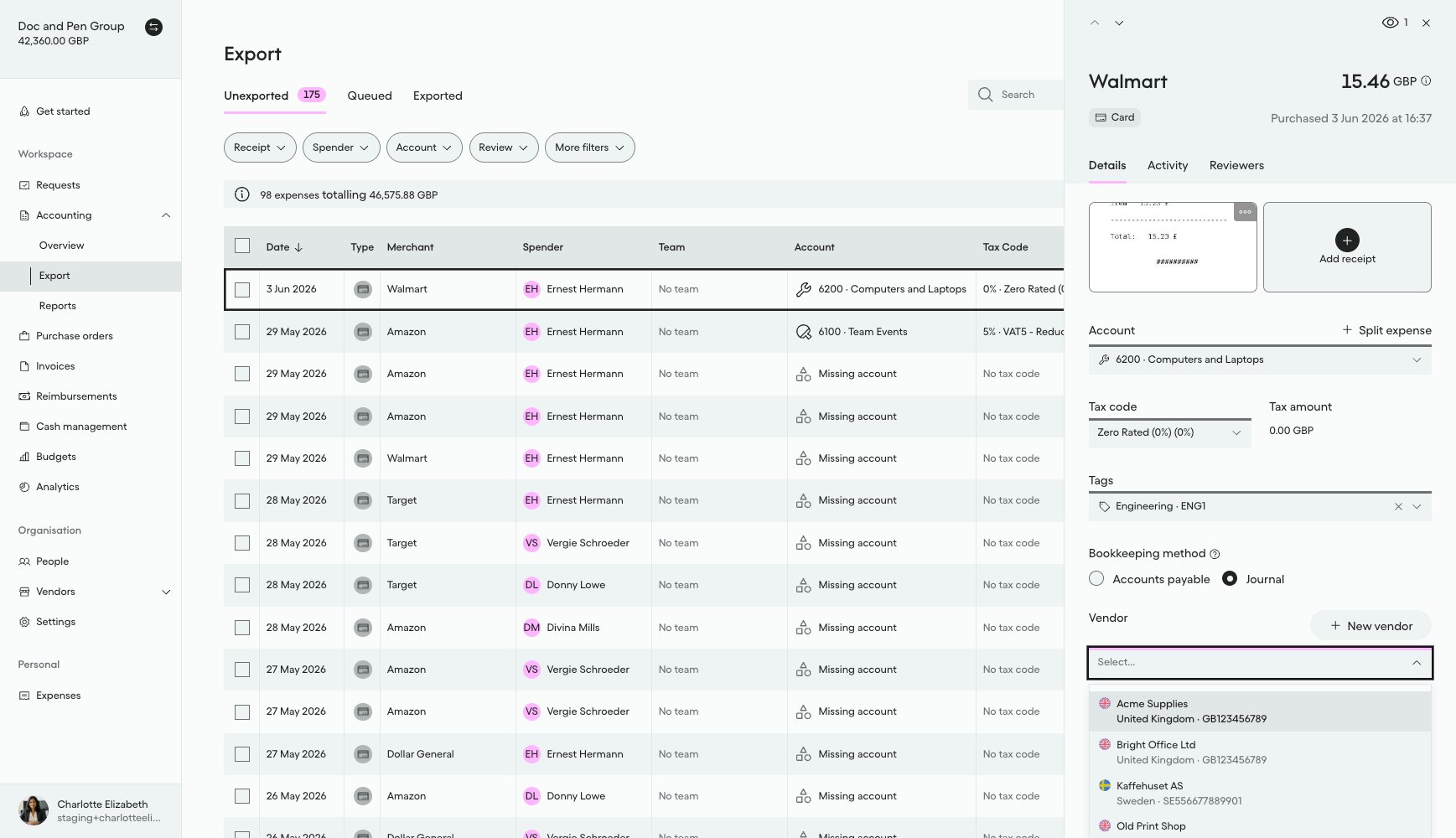
#### What it looks like in Pleo Web App

1. Select **Accounting** from the main left-hand navigation.
2. Select **Export** from the sub-menu.
3. Click on a row to open the details panel for that expense.
4. Select the **Vendor** drop-down menu to view active Vendors.

"Bright Office Ltd" is now searchable and selectable in the Vendor field on an expense, confirming the Vendor was created as `ACTIVE`.

<div style={{ textAlign: "center" }}>
  <img src="https://mintcdn.com/pleo-61d4d38b/OQXz7YYPcGlsTpec/images/current/accounting-integrations/imports/vendor-sync/ui-vendors-active-added-bright-office.png?fit=max&auto=format&n=OQXz7YYPcGlsTpec&q=85&s=cc6b1af8b66b6b66ba5c3f562a848b69" alt="Vendor dropdown on an expense showing newly created Bright Office Ltd" width="100%" style={{ display: "block", margin: "0 auto" }} data-path="images/current/accounting-integrations/imports/vendor-sync/ui-vendors-active-added-bright-office.png" />
</div>

***

## Handling Edge Cases

The following apply to every write in this suite, Create, Unarchive, Update, and Archive alike, not just this page. The other how-tos link back here rather than repeating them.

* **Create collides with an existing `externalId`:** `externalId` is unique per company, so this call returns `409 CONFLICT_EXCEPTION` if a Vendor with that `externalId` already exists, active or archived. This should not happen for a vendor that went through matching correctly, since that step already checks both states, so treat it as a sign the prior fetch-and-match step missed something (for example, a race condition with a concurrent sync run). Look up the existing Vendor by that `externalId` and unarchive or update it instead of retrying Create, and log the anomaly for investigation.
* **Partial write failure:** If one write (create, update, unarchive, or archive) fails partway through the batch, do not abort the entire run. Continue processing the remaining vendors, and log or report the specific vendor(s) that failed so they can be retried on the next sync cycle.
* **Unknown write outcome:** If a create, update, unarchive, or archive request times out or the response is lost after the request was sent, its outcome is unknown, not necessarily a failure. Do not blindly re-send the same write on this run, since it may have already applied. Instead, re-fetch that specific Vendor's current Pleo state before deciding: if it already matches the intended target state, treat the write as a no-op success and move on; if it does not, retry the write on the next sync cycle rather than immediately, so a slow-but-successful original request has time to be reflected before you re-check.

***

## Result

| Vendor                      | AS Status | Pleo State Before | Action  | Final Pleo State |
| --------------------------- | --------- | ----------------- | ------- | ---------------- |
| Bright Office Ltd (EXT-003) | Active    | Does not exist    | Created | Active           |

***

## What Comes Next?

<WhatComesNext href="/docs/current/how-tos/accounting-integrations/imports/vendors/how-to-unarchive-vendors">
  How to Unarchive Vendors
</WhatComesNext>

***

<div className="text-xs uppercase" style={{ fontVariant: 'small-caps' }}>
  this how-to is part of:
</div>

<div className="mt-4 flex flex-wrap gap-2">
  <a
    href="/docs/current/guides/accounting-integrations/imports/vendor-sync-workflow-guide"
    className="inline-flex items-center rounded-full border border-gray-300 dark:border-gray-600
px-3 py-1 text-xs font-medium
bg-white dark:bg-[#1f262b] text-black dark:text-white
hover:bg-gray-100 dark:hover:bg-[#2b2f33]
transition-colors"
  >
    Vendor Sync Workflow Guide
  </a>
</div>

***

## Related Reading

* [How to Fetch and Match Vendors](/docs/current/how-tos/accounting-integrations/imports/vendors/how-to-fetch-and-match-vendors)
* [How to Unarchive Vendors](/docs/current/how-tos/accounting-integrations/imports/vendors/how-to-unarchive-vendors)
* [Sync Vendors Integration Design](/docs/current/integration-design/accounting-integrations/imports/vendors/integration-design-vendor-sync)
* [Vendor Sync Data Mapping](/docs/current/integration-design/accounting-integrations/imports/vendors/integration-design-vendor-sync-data-mapping)
* [Platform Capabilities: Vendor Sync](/docs/current/platform/accounting-integrations/imports/vendors/vendor-sync-overview)

***