This how-to covers the fetch and match phase of Vendor Sync: retrieving vendors from the Accounting System and Vendors from Pleo, then determining what action is needed for each. For the write operations, see [How to Create Vendors](/docs/current/how-tos/accounting-integrations/imports/vendors/how-to-create-vendors), [How to Unarchive Vendors](/docs/current/how-tos/accounting-integrations/imports/vendors/how-to-unarchive-vendors), [How to Update Vendors](/docs/current/how-tos/accounting-integrations/imports/vendors/how-to-update-vendors), and [How to Archive Vendors](/docs/current/how-tos/accounting-integrations/imports/vendors/how-to-archive-vendors).
Your integration must:
* Retrieve active vendors from the AS
* Retrieve all Vendors (active and archived) from Pleo
* Match AS vendors to Pleo Vendors by `externalId` to determine what action is needed
## Prerequisites
Before you begin:
* You're familiar with the [Vendor Sync Implementation Overview](/docs/current/integration-design/accounting-integrations/imports/vendors/integration-design-vendor-sync-overview) and [Sync Vendors](/docs/current/integration-design/accounting-integrations/imports/vendors/integration-design-vendor-sync)
* Your integration is authenticated using one of the [supported authentication methods](/docs/current/integration-design/auth/integration-design-auth-overview#authentication-policy-overview)
* Your integration can call Pleo's Vendors API endpoints
* Your integration can call the target Accounting System's own API to fetch active vendors
## Scenario
This how-to uses a consistent example to illustrate each step. The table below shows the starting state in both systems before this sync runs.
| Vendor (AS) | AS Status | Vendor (Pleo) | Pleo Status |
| --------------------------- | --------- | ------------------------ | -------------- |
| Acme Supplies (EXT-001) | Active | Acme Supplies (EXT-001) | Active |
| Nordic Freight (EXT-002) | Active | Nordic Freight (EXT-002) | Archived |
| Bright Office Ltd (EXT-003) | Active | — | Does not exist |
| Kaffehuset AS (EXT-004) | Active | Kaffehuset AS (EXT-004) | Active |
| — | — | Old Print Shop (EXT-005) | Active |
## Steps
### 1. Retrieve Active Vendors from the Accounting System
Fetch all active vendors from the AS.
**Example Pseudo:**
```pseudo theme={null}
rawActiveASVendors = fetchActiveVendorsFromAS()
// Apply the data integrity rules from Vendor Sync's design:
// https://docs.pleo.io/docs/current/integration-design/accounting-integrations/imports/vendors/integration-design-vendor-sync
activeASVendors = []
externalIdCounts = countBy(rawActiveASVendors, v => v.externalId)
for vendor in rawActiveASVendors:
if isEmpty(vendor.externalId):
logError("Skipped vendor with empty/null externalId", vendor)
continue
if externalIdCounts[vendor.externalId] > 1:
logError("Skipped vendor with duplicate externalId", vendor)
continue
activeASVendors.push(vendor)
```
After this filtering, `activeASVendors` is the set your integration uses for matching, for creating new Pleo Vendors, and later for working out which Pleo Vendors have no matching active AS vendor.
A skipped vendor (empty or duplicate `externalId`) doesn't count as "not in the AS" for that last step. It's excluded because its identity can't be trusted yet, not because it's confirmed inactive.
See [How to Archive Vendors](/docs/current/how-tos/accounting-integrations/imports/vendors/how-to-archive-vendors#1-archive-the-vendor) for why that distinction matters.
#### Example Result
| Vendor | externalId | Code | Country | Currency |
| ----------------- | ---------- | ---- | ------- | -------- |
| Acme Supplies | EXT-001 | 1001 | GB | GBP |
| Nordic Freight | EXT-002 | 1002 | DK | DKK |
| Bright Office Ltd | EXT-003 | 1003 | GB | GBP |
| Kaffehuset AS | EXT-004 | 1004 | DK | DKK |
***
### 2. Retrieve All Vendors from Pleo
**API Endpoint**: POST [`/v1/vendors:search`](/reference/external-vendors/fetches-vendors-by-search-criteria)
Fetch both active and archived Vendors from Pleo. Including archived Vendors allows unarchiving rather than creating duplicates.
Filter the search to the `ACTIVE` and `ARCHIVED` states explicitly using the `states` field. This excludes `DRAFT` Vendors, which belong to the [Vendor Creation](/docs/current/platform/exports/vendors/vendor-creation-overview) flow and are not handled by Vendor Sync's matching logic.
**Example Pseudo:**
```pseudo theme={null}
pleoVendors = []
cursor = null
do:
page = fetchVendorsFromPleo(states: ["ACTIVE", "ARCHIVED"], after: cursor)
pleoVendors.extend(page.data)
cursor = page.pagination.endCursor
while page.pagination.hasNextPage
```
Fetch every page before matching. Acting on a partial (first-page-only) result set can miss Vendors and cause them to be incorrectly archived or recreated. If any page fetch fails partway through, abort the sync run entirely rather than matching against an incomplete result set; retry the full fetch on the next cycle.
#### Example Request
```bash theme={null}
curl -X POST "https://external.staging.pleo.io/v1/vendors:search?company_id=12abc3d4-e567-890e-1234-abc56e78fabc" \
-H "Authorization: Bearer " \
-H "Content-Type: application/json;charset=UTF-8" \
-d '{"states": ["ACTIVE", "ARCHIVED"]}'
```
```bash theme={null}
curl --request POST \
-u "pls_1ab2cd3e4f5g6h7a89b012c34de56f78_gabc90:" \
-H "Accept: application/json;charset=UTF-8" \
-H "Content-Type: application/json;charset=UTF-8" \
"https://external.staging.pleo.io/v1/vendors:search?company_id=12abc3d4-e567-890e-1234-abc56e78fabc" \
-d '{"states": ["ACTIVE", "ARCHIVED"]}' \
| jq
```
#### Example Response
```json theme={null}
{
"data": [
{
"id": "d4e5f6a7-b890-123b-4567-def89b01cabc",
"companyId": "12abc3d4-e567-890e-1234-abc56e78fabc",
"name": "Acme Supplies",
"code": "1001",
"externalId": "EXT-001",
"country": "GB",
"defaultCurrency": "GBP",
"state": "ACTIVE",
"accountingSystem": "custom_api_integration",
"createdAt": "2026-06-01T08:46:55.778461Z",
"updatedAt": "2026-06-01T08:47:11.345094Z"
},
{
"id": "c3d4e5f6-a789-012a-3456-cde78a90babc",
"companyId": "12abc3d4-e567-890e-1234-abc56e78fabc",
"name": "Nordic Freight",
"code": "1002",
"externalId": "EXT-002",
"country": "DK",
"defaultCurrency": "DKK",
"state": "ARCHIVED",
"accountingSystem": "custom_api_integration",
"createdAt": "2026-06-01T08:47:59.430364Z",
"updatedAt": "2026-06-01T08:49:41.829869Z"
},
{
"id": "b2c3d4e5-f678-901f-2345-bcd67f89aabc",
"companyId": "12abc3d4-e567-890e-1234-abc56e78fabc",
"name": "Kaffehuset AS",
"code": "1004",
"externalId": "EXT-004",
"country": "SE",
"defaultCurrency": "SEK",
"state": "ACTIVE",
"accountingSystem": "custom_api_integration",
"createdAt": "2026-06-01T08:48:52.799351Z",
"updatedAt": "2026-06-01T08:49:30.424444Z"
},
{
"id": "a1b2c3d4-e567-890e-1234-abc56e78fabc",
"companyId": "12abc3d4-e567-890e-1234-abc56e78fabc",
"name": "Old Print Shop",
"code": "1005",
"externalId": "EXT-005",
"country": "GB",
"defaultCurrency": "GBP",
"state": "ACTIVE",
"accountingSystem": "custom_api_integration",
"createdAt": "2026-06-01T08:49:26.679397Z",
"updatedAt": "2026-06-01T08:49:26.679397Z"
}
],
"pagination": {
"hasPreviousPage": false,
"hasNextPage": false,
"endCursor": "V5MEDOJJYJDJTLHZ2BMGH62EGU",
"total": 4
}
}
```
Check `hasNextPage` to know when to stop paginating. That's the only reliable signal.
`endCursor` is not a reliable signal on its own: it can still be a non-null string on the last page, as the example above shows.
#### Example Result
| Vendor | externalId | Status |
| -------------- | ---------- | -------------------------------------------------------------- |
| Acme Supplies | EXT-001 | Active |
| Nordic Freight | EXT-002 | Archived |
| Kaffehuset AS | EXT-004 | Active (country and currency differ from AS: SE/SEK vs DK/DKK) |
| Old Print Shop | EXT-005 | Active |
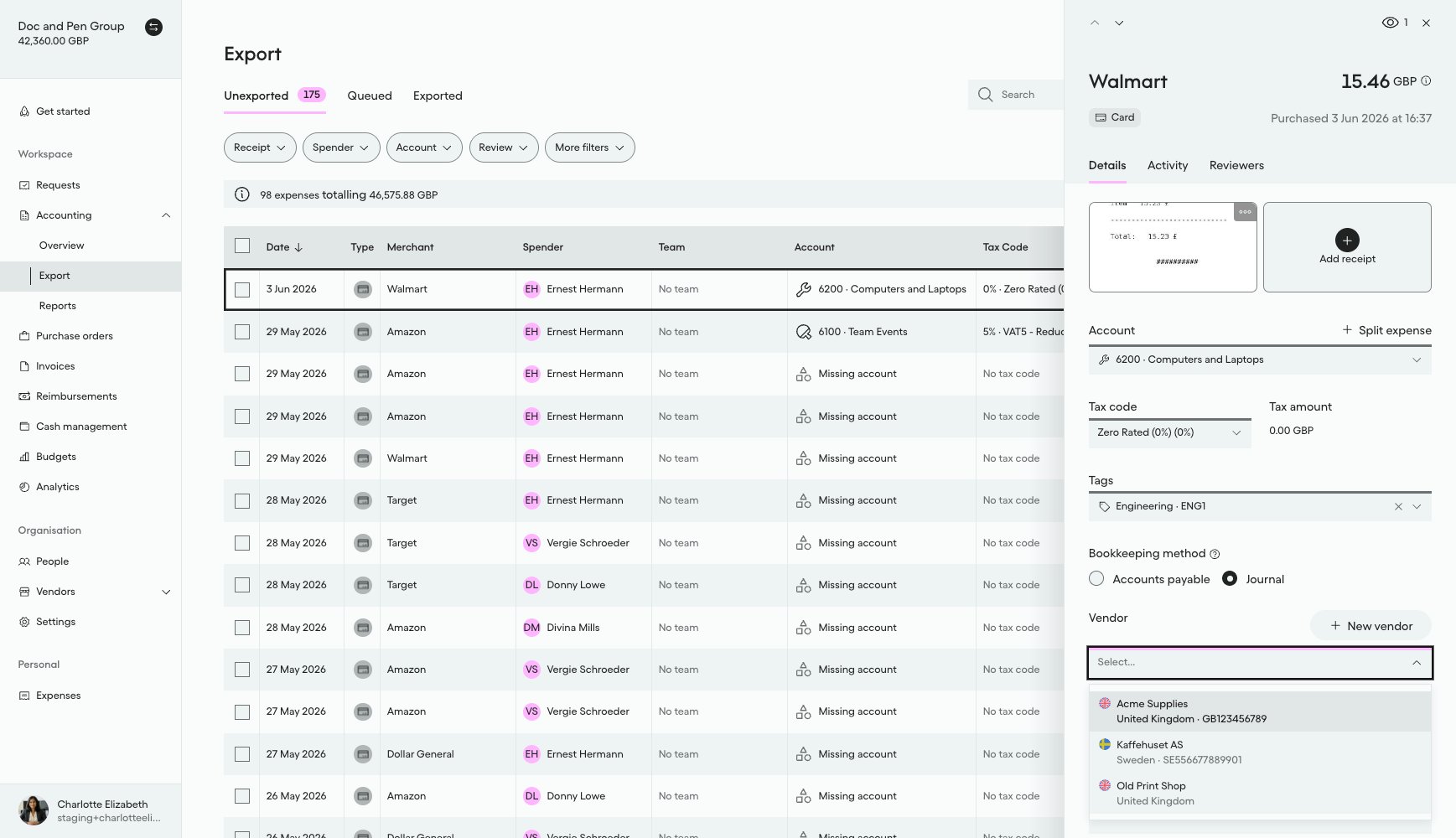
#### What it looks like in Pleo Web App
Pleo has no dedicated Vendors list page, so the Vendor field on an expense's detail panel is used to confirm which Vendors are currently active and searchable:
1. Select **Accounting** from the main left-hand navigation.
2. Select **Export** from the sub-menu.
3. Click on a row to open the details panel for that expense.
4. Select the **Vendor** drop-down menu to view active Vendors.
Archived Vendors do not appear in this dropdown.
***
### 3. Match AS Vendors to Pleo Vendors by externalId
For each active AS vendor, attempt to find a matching Vendor in Pleo using `externalId`.
Pleo enforces `externalId` uniqueness per company at the database level. Creating a Vendor with an `externalId` already used by another Vendor for that company, archived ones included, is rejected with `409 CONFLICT_EXCEPTION`.
Existing Pleo Vendor records should therefore already be unique, but that doesn't guarantee it. A pair of Pleo Vendors sharing an `externalId` from legacy data, or from any other source of bad data, can still be present.
Defend against that case when matching, as shown below.
**Example Pseudo:**
```pseudo theme={null}
pleoExternalIdCounts = countBy(pleoVendors, v => v.externalId)
pleoVendorsByExternalId = {}
poisonedExternalIds = new Set()
for vendor in pleoVendors:
if pleoExternalIdCounts[vendor.externalId] > 1:
logError("Skipped Pleo Vendor with duplicate externalId", vendor)
poisonedExternalIds.add(vendor.externalId)
continue
pleoVendorsByExternalId[vendor.externalId] = vendor
actions = []
for vendor in activeASVendors:
if poisonedExternalIds.has(vendor.externalId):
logError("Skipped AS Vendor: matching externalId has a Pleo-side duplicate", vendor)
continue
matchedVendor = pleoVendorsByExternalId[vendor.externalId]
if matchedVendor is null:
if pendingActivationExternalIds.has(vendor.externalId):
logInfo("Skipped: externalId already claimed by an in-flight Vendor Creation attempt", vendor)
continue
actions.add({ action: "CREATE", asVendor: vendor })
else if matchedVendor.state == "ARCHIVED":
actions.add({ action: "UNARCHIVE", asVendor: vendor, pleoVendor: matchedVendor })
else if detailsDiffer(matchedVendor, vendor):
actions.add({ action: "UPDATE", asVendor: vendor, pleoVendor: matchedVendor })
// else: no action needed
```
The `pleoVendorsByExternalId` map built in the pseudo-code above deliberately skips any `externalId` with a Pleo-side duplicate, so a lookup against it returns `null` for those, exactly like it would for an `externalId` that has no Pleo Vendor at all.
The `poisonedExternalIds` check above catches that case first, so the AS vendor is skipped before it ever reaches the `CREATE` branch. Without that check, it would be indistinguishable from a genuine new Vendor and get created.
Creating one anyway would add a third, conflicting Pleo Vendor for the same `externalId`. Leave the existing (duplicated) Pleo Vendors untouched until the duplicate is resolved manually.
`pendingActivationExternalIds`, checked in the pseudo-code above, is the set of AS-assigned `externalId`s that [Vendor Creation](/docs/current/integration-design/exports/vendors/integration-design-vendor-creation-create-and-activate#failure-handling) has already created in the AS, but not yet activated in Pleo.
Skip creation for these. Creating one anyway would produce a duplicate Vendor once Vendor Creation's own activation step succeeds or is retried.
See [Concurrency with Vendor Creation](/docs/current/integration-design/accounting-integrations/imports/vendors/integration-design-vendor-sync#concurrency-with-vendor-creation) for the full race this prevents.
This step only determines the action needed for each vendor. See [How to Create Vendors](/docs/current/how-tos/accounting-integrations/imports/vendors/how-to-create-vendors), [How to Unarchive Vendors](/docs/current/how-tos/accounting-integrations/imports/vendors/how-to-unarchive-vendors), [How to Update Vendors](/docs/current/how-tos/accounting-integrations/imports/vendors/how-to-update-vendors), and [How to Archive Vendors](/docs/current/how-tos/accounting-integrations/imports/vendors/how-to-archive-vendors) for how each `action` is executed.
#### Example Result
| AS Vendor | Pleo Vendor | Pleo Status | Action |
| --------------------------- | ------------------------ | ----------------------------------- | --------- |
| Acme Supplies (EXT-001) | Acme Supplies (EXT-001) | Active, matches | No action |
| Nordic Freight (EXT-002) | Nordic Freight (EXT-002) | Archived | Unarchive |
| Bright Office Ltd (EXT-003) | — | Does not exist | Create |
| Kaffehuset AS (EXT-004) | Kaffehuset AS (EXT-004) | Active, country and currency differ | Update |
| — | Old Print Shop (EXT-005) | Active | Archive |
Matching only ever uses `externalId`.
If a vendor's `name` or `code` changes in the AS, that's not a signal to create a new vendor. It's still the same vendor: match it by `externalId` and treat the change as an update.
***
## Handling Edge Cases
* **Empty result set:** If either fetch returns no vendors (no active vendors in the AS, or no Vendors in Pleo), the matching step has nothing to pair up. This is a normal outcome, not an error; the one-sided steps still run as normal, for example Create for every AS vendor when Pleo has none, or, when the AS has none, treating every active Pleo Vendor as unmatched for this run following the normal [two-consecutive-run archive safeguard](/docs/current/integration-design/accounting-integrations/imports/vendors/integration-design-vendor-sync#4-archive-unmatched-vendors), not archiving them immediately on this single run.
* **Already-active or already-archived conflicts:** Matching a vendor that requires no change (Pleo already reflects the AS's active state and details) is expected and should not be logged as a discrepancy.
***
## What Comes Next?
How to Create Vendors
***