> ## Documentation Index
> Fetch the complete documentation index at: https://developers.pleo.io/llms.txt
> Use this file to discover all available pages before exploring further.

# How to Detect Draft Vendors

> For Vendor Creation, how to reliably detect new DRAFT vendors created directly in Pleo, using webhooks or polling.

export const DetectDraftVendorOptionsDiagram = () => {
  const [isDark, setIsDark] = useState(false);
  useEffect(() => {
    const check = () => setIsDark(document.documentElement.classList.contains("dark"));
    check();
    const observer = new MutationObserver(check);
    observer.observe(document.documentElement, {
      attributes: true,
      attributeFilter: ["class"]
    });
    return () => observer.disconnect();
  }, []);
  const nodeFill = isDark ? "#212222" : "#EEF4F4";
  const nodeStroke = isDark ? "#848989" : "#E1E6E6";
  const nodeTextStyle = isDark ? ",color:#EEF4F4" : ",color:#131414";
  const outerFill = isDark ? "#212222" : "#EEF4F4";
  const outerStroke = isDark ? "#848989" : "#212222";
  const outerTextStyle = isDark ? ",color:#EEF4F4" : ",color:#212222";
  const linkStyle = isDark ? "" : "linkStyle default stroke:#848989,stroke-width:1px;";
  const diagram = `
%%{init: {"themeVariables": {"fontSize": "10px"}}}%%
flowchart LR
    A["Choose Discovery<br>Strategy"] --> B["Option A: Webhook<br>Trigger (Recommended)"]
    A --> C["Option B: Polling<br>(fallback)"]
    B --> D["Create Vendor<br>in AS"]
    C --> D

click B "#option-a-webhook-trigger-recommended"
click C "#option-b-polling-fallback-only-if-webhooks-cannot-be-supported"

style A white-space:normal,fill:${outerFill},stroke:${outerStroke},stroke-dasharray:5 5${outerTextStyle}
style B white-space:normal,fill:${nodeFill},stroke:${nodeStroke}${nodeTextStyle}
style C white-space:normal,fill:${nodeFill},stroke:${nodeStroke}${nodeTextStyle}
style D white-space:normal,fill:${outerFill},stroke:${outerStroke},stroke-dasharray:5 5${outerTextStyle}
${linkStyle}
`;
  return <Mermaid chart={diagram} />;
};

export const VendorCreationWorkflowDiagramTopNav = ({highlight}) => {
  const [isDark, setIsDark] = useState(false);
  useEffect(() => {
    const check = () => setIsDark(document.documentElement.classList.contains("dark"));
    check();
    const observer = new MutationObserver(check);
    observer.observe(document.documentElement, {
      attributes: true,
      attributeFilter: ["class"]
    });
    return () => observer.disconnect();
  }, []);
  const nodeFill = isDark ? "#212222" : "#EEF4F4";
  const nodeStroke = isDark ? "#848989" : "#E1E6E6";
  const nodeTextStyle = isDark ? ",color:#EEF4F4" : ",color:#131414";
  const subgraphFill = isDark ? "#131414" : "#ffffff";
  const subgraphStroke = isDark ? "#848989" : "#6B7070";
  const subgraphTextStyle = isDark ? ",color:#EEF4F4" : ",color:#6B7070";
  const linkStyle = isDark ? "" : "linkStyle default stroke:#848989,stroke-width:1px;";
  const highlightStyle = highlight ? `style ${highlight} stroke:#FEB6FE,stroke-width:2px` : "";
  const diagram = `
%%{init: {"themeVariables": {"fontSize": "16px"}}}%%
flowchart LR

subgraph Pleo1["Pleo"]
    A["1. Create Vendor in Pleo"]
end

subgraph Integration["Integration"]
    B["2. Detect Draft<br>Vendor<br>"]
    C["3. Create Vendor<br>in AS<br>"]
    B --> C
end

subgraph Pleo2["Pleo"]
    D["4. Activate Vendor in Pleo"]
end

A --> B
C --> D

click A "/docs/current/how-tos/accounting-integrations/vendors/how-to-create-vendors-in-pleo"
click B "/docs/current/how-tos/accounting-integrations/vendors/how-to-detect-draft-vendors"
click C "/docs/current/how-tos/accounting-integrations/vendors/how-to-create-vendor-in-as"
click D "/docs/current/how-tos/accounting-integrations/vendors/how-to-activate-vendor-in-pleo"

style A white-space:normal,fill:${nodeFill},stroke:${nodeStroke}${nodeTextStyle}
style B white-space:normal,fill:${nodeFill},stroke:${nodeStroke}${nodeTextStyle}
style C white-space:normal,fill:${nodeFill},stroke:${nodeStroke}${nodeTextStyle}
style D white-space:normal,fill:${nodeFill},stroke:${nodeStroke}${nodeTextStyle}

style Pleo1 fill:${subgraphFill},stroke:${subgraphStroke}${subgraphTextStyle}
style Integration fill:${subgraphFill},stroke:${subgraphStroke}${subgraphTextStyle}
style Pleo2 fill:${subgraphFill},stroke:${subgraphStroke}${subgraphTextStyle}

${highlightStyle}
${linkStyle}
`;
  return <Mermaid chart={diagram} />;
};

export const WhatComesNext = ({children, href}) => <div className="mt-4">
    <a href={href} className="btn-primary">
      {children} →
    </a>
  </div>;

export const NoteCallout = ({title, children}) => <div className="callout-box callout-note">
    <div className="callout-row">
      <span className="callout-icon">
        <svg width="22" height="22" xmlns="http://www.w3.org/2000/svg" viewBox="0 0 256 256" fill="currentColor"><path d="M208,104a79.86,79.86,0,0,1-30.59,62.92A24.29,24.29,0,0,0,168,186v6a8,8,0,0,1-8,8H96a8,8,0,0,1-8-8v-6a24.11,24.11,0,0,0-9.3-19A79.87,79.87,0,0,1,48,104.45C47.76,61.09,82.72,25,126.07,24A80,80,0,0,1,208,104Z" opacity="0.2" /><path d="M176,232a8,8,0,0,1-8,8H88a8,8,0,0,1,0-16h80A8,8,0,0,1,176,232Zm40-128a87.55,87.55,0,0,1-33.64,69.21A16.24,16.24,0,0,0,176,186v6a16,16,0,0,1-16,16H96a16,16,0,0,1-16-16v-6a16,16,0,0,0-6.23-12.66A87.59,87.59,0,0,1,40,104.49C39.74,56.83,78.26,17.14,125.88,16A88,88,0,0,1,216,104Zm-16,0a72,72,0,0,0-73.74-72c-39,.92-70.47,33.39-70.26,72.39a71.65,71.65,0,0,0,27.64,56.3A32,32,0,0,1,96,186v6h64v-6a32.15,32.15,0,0,1,12.47-25.35A71.65,71.65,0,0,0,200,104Zm-16.11-9.34a57.6,57.6,0,0,0-46.56-46.55,8,8,0,0,0-2.66,15.78c16.57,2.79,30.63,16.85,33.44,33.45A8,8,0,0,0,176,104a9,9,0,0,0,1.35-.11A8,8,0,0,0,183.89,94.66Z" /></svg>
      </span>
      <div>
        {title && <div className="callout-title">
            {title}
          </div>}
        <div className="callout-body">
          {children}
        </div>
      </div>
    </div>
  </div>;

export const RememberCallout = ({title, children}) => <div className="callout-box callout-remember">
    <div className="callout-row">
      <span className="callout-icon">
        <svg width="22" height="22" xmlns="http://www.w3.org/2000/svg" viewBox="0 0 256 256" fill="currentColor"><path d="M229.66,98.34,172.39,155.8c11.46,22.93-1.72,45.86-10.11,57a8,8,0,0,1-12,.83L42.34,105.76A8,8,0,0,1,43,93.85c29.65-23.92,57.4-10,57.4-10l57.27-57.46a8,8,0,0,1,11.31,0L229.66,87A8,8,0,0,1,229.66,98.34Z" opacity="0.2" /><path d="M235.32,81.37,174.63,20.69a16,16,0,0,0-22.63,0L98.37,74.49c-10.66-3.34-35-7.37-60.4,13.14a16,16,0,0,0-1.29,23.78L85,159.71,42.34,202.34a8,8,0,0,0,11.32,11.32L96.29,171l48.29,48.29A16,16,0,0,0,155.9,224c.38,0,.75,0,1.13,0a15.93,15.93,0,0,0,11.64-6.33c19.64-26.1,17.75-47.32,13.19-60L235.33,104A16,16,0,0,0,235.32,81.37ZM224,92.69h0l-57.27,57.46a8,8,0,0,0-1.49,9.22c9.46,18.93-1.8,38.59-9.34,48.62L48,100.08c12.08-9.74,23.64-12.31,32.48-12.31A40.13,40.13,0,0,1,96.81,91a8,8,0,0,0,9.25-1.51L163.32,32,224,92.68Z" /></svg>
      </span>
      <div>
        {title && <div className="callout-title">
            {title}
          </div>}
        <div className="callout-body">
          {children}
        </div>
      </div>
    </div>
  </div>;

<VendorCreationWorkflowDiagramTopNav highlight="B" />

<div className="border-[1px] rounded-none p-4 bg-[#ffffff] border-[#FEB6FE] dark:bg-[#131414] dark:border-[#FEB6FE]">
  <DetectDraftVendorOptionsDiagram />
</div>

This how-to explains how an integration detects a `DRAFT` Vendor created directly in Pleo, ready to be created in the Accounting System.

Run this after [How to Create Vendors in Pleo](/docs/current/how-tos/accounting-integrations/vendors/how-to-create-vendors-in-pleo), which covers the bookkeeper action that produces the `DRAFT` Vendor.

A `DRAFT` Vendor exists when a bookkeeper adds a new Vendor in Pleo that has no matching record in the AS yet. It has no `code` or `externalId` until the integration creates the record in the AS and activates it.

Your integration must:

* Detect new `DRAFT` Vendors, ideally the moment they are created
* Avoid re-detecting a Vendor that has already been created in the AS

## Prerequisites

Before you begin:

* You have completed [How to Create Vendors in Pleo](/docs/current/how-tos/accounting-integrations/vendors/how-to-create-vendors-in-pleo), or a bookkeeper has otherwise added a new Vendor directly in Pleo
* You're familiar with [Detect Draft Vendors](/docs/current/integration-design/exports/vendors/integration-design-vendor-creation-detect-draft-vendors)
* Your integration is authenticated using one of the [supported authentication methods](/docs/current/integration-design/auth/integration-design-auth-overview#authentication-policy-overview)
* Your integration can call Pleo's Vendors API endpoints
* Webhooks or polling are configured

## Scenario

This how-to continues from the [How to Create Vendors in Pleo](/docs/current/how-tos/accounting-integrations/vendors/how-to-create-vendors-in-pleo) scenario: a bookkeeper added "Greenfield Logistics" as a new Vendor in Pleo, without it existing yet in the Accounting System.

## Steps

### 1. Detect New Draft Vendors

Two discovery strategies are supported.

#### Option A: Webhook Trigger (Recommended)

Subscribe to the [`v1.vendor.created`](/reference/webhooks/webhook-events) webhook. See [Configuring Webhooks During Integration](/reference/webhooks/overview-webhooks#configuring-webhooks-during-integration) for subscription setup.

When the event is received, its payload already contains the Vendor's details, so no additional fetch is required.

<RememberCallout title="Remember">
  Webhooks can be lost. Pleo retries a failed delivery for up to about 27.5 hours, then stops (see [Webhook Notification Delivery Retries](/reference/webhooks/overview-webhooks#webhook-notification-delivery-retries)). If your endpoint is down longer than that, for example during an extended outage, that webhook is gone for good, and you have no way to know the Vendor was created.

  <br />

  <br />

  Run a low-frequency backstop poll (for example, hourly) using Option B below, even when webhooks are your main detection method. It catches any `DRAFT` Vendor whose webhook was never delivered.
</RememberCallout>

#### Example Webhook Payload

```json theme={null}
{
  "data": {
    "id": "c27ed4d6-3d3d-458e-8f3f-735fdf32a3bc",
    "companyId": "12abc3d4-e567-890e-1234-abc56e78fabc",
    "name": "Greenfield Logistics",
    "country": "GB",
    "registrationNumber": "",
    "taxRegistrationNumber": "GB987654321",
    "code": null,
    "state": "DRAFT",
    "defaultCurrency": "GBP",
    "createdBy": "22aff90a-a53d-4f0c-851f-dd4cc85ac947",
    "createdAt": "2026-07-08T10:05:43.530450712Z",
    "updatedAt": "2026-07-08T10:05:43.530450712Z",
    "deletedAt": null
  },
  "eventType": "v1.vendor.created",
  "eventId": "13d8550d-dd22-46e9-ae18-c171846ba373"
}
```

<NoteCallout title="Note">
  In the example above, `registrationNumber` is `""` (empty string), but `code` is `null`. Both mean the same thing: no value.

  <br />

  <br />

  Pleo uses `""` for optional text fields that were never filled in, like `registrationNumber` and `taxRegistrationNumber`. It uses `null` for identifier fields not yet assigned, like `code` before activation.

  <br />

  <br />

  When reading a Vendor, treat `""` and `null` the same way. When writing these fields to the Accounting System, check its own rules first: some systems treat `""` and `null` differently, or reject one of them. Normalise the value to match, rather than passing it through unchanged.
</NoteCallout>

Proceed straight to [How to Create a Vendor in the AS](/docs/current/how-tos/accounting-integrations/vendors/how-to-create-vendor-in-as) using the Vendor `id` and details from the payload.

#### Option B: Polling (fallback, only if webhooks cannot be supported)

**API Endpoint**: POST [`/v1/vendors:search`](/reference/external-vendors/fetches-vendors-by-search-criteria)

Periodically call the search endpoint filtering on `states: ["DRAFT"]`, on the [required polling interval of every 5 minutes](/docs/current/integration-design/exports/vendors/integration-design-vendor-creation-detect-draft-vendors#polling-fallback-only-if-webhooks-cannot-be-supported).

**Example Pseudo:**

```pseudo theme={null}
draftVendors = []
cursor = null

do:
    page = searchVendors(states=["DRAFT"], after: cursor)
    draftVendors.extend(page.data)
    cursor = page.pagination.endCursor
while page.pagination.hasNextPage

for vendor in draftVendors:
    createAndActivate(vendor)
```

Fetch every page before processing. Stopping after the first page can leave DRAFT Vendors undetected until the next poll cycle.

<RememberCallout title="Remember">
  A poll with multiple pages is not an instant snapshot. Fetching all the pages takes time.

  <br />

  <br />

  If a bookkeeper adds a new Vendor while you're still fetching pages, it might land on a page you've already passed. This poll can miss it.

  <br />

  <br />

  That Vendor isn't lost: the next poll cycle picks it up, or the webhook catches it right away if you're also subscribed.

  <br />

  <br />

  Don't treat one poll's results as a complete list of every `DRAFT` Vendor that existed the moment the poll started. It's only complete as of when each page was actually fetched.
</RememberCallout>

#### Example Request

<Tabs>
  <Tab title="OAuth 2.0">
    ```bash theme={null}
    curl -X POST "https://external.staging.pleo.io/v1/vendors:search?company_id=12abc3d4-e567-890e-1234-abc56e78fabc" \
      -H "Authorization: Bearer <access_token>" \
      -H "Content-Type: application/json;charset=UTF-8" \
      -d '{
            "states": ["DRAFT"]
          }'
    ```
  </Tab>

  <Tab title="API Key">
    ```bash theme={null}
    curl --request POST \
      -u "pls_1ab2cd3e4f5g6h7a89b012c34de56f78_gabc90:" \
      -H "Accept: application/json;charset=UTF-8" \
      -H "Content-Type: application/json;charset=UTF-8" \
      "https://external.staging.pleo.io/v1/vendors:search?company_id=12abc3d4-e567-890e-1234-abc56e78fabc" \
      -d '{
            "states": ["DRAFT"]
          }' \
    | jq
    ```
  </Tab>
</Tabs>

#### Example Response

```json theme={null}
{
  "data": [
    {
      "id": "c27ed4d6-3d3d-458e-8f3f-735fdf32a3bc",
      "companyId": "12abc3d4-e567-890e-1234-abc56e78fabc",
      "name": "Greenfield Logistics",
      "country": "GB",
      "registrationNumber": "",
      "taxRegistrationNumber": "GB987654321",
      "state": "DRAFT",
      "defaultCurrency": "GBP",
      "createdAt": "2026-07-08T10:05:43.530450712Z",
      "updatedAt": "2026-07-08T10:05:43.530450712Z"
    }
  ],
  "pagination": {
    "hasPreviousPage": false,
    "hasNextPage": false,
    "endCursor": "ZMKHP6I3F5E43BOVXNINZOZGM4",
    "total": 1
  }
}
```

<NoteCallout title="Note">
  The response's `pagination` object (shown above) tells you whether more `DRAFT` Vendors exist beyond this page, and how to fetch them. This is what the loop in the pseudo-code above is reading from.

  <br />

  <br />

  Check `hasNextPage` to know when to stop paginating. That's the only reliable signal.

  <br />

  <br />

  `endCursor` is not a reliable signal on its own: it can still be a non-null string on the last page, as the example above shows.

  <br />

  <br />

  While `hasNextPage` is `true`, pass `endCursor` as the `after` parameter on your next request, to fetch the next page.
</NoteCallout>

<NoteCallout title="Note">
  This polling method (Option B) only checks every [5 minutes](/docs/current/integration-design/exports/vendors/integration-design-vendor-creation-detect-draft-vendors#polling-fallback-only-if-webhooks-cannot-be-supported). A bookkeeper can add a new Vendor in Pleo and it can sit undetected for up to 5 minutes, until your next poll runs.

  <br />

  <br />

  Prefer the webhook method (Option A above) where you can. It notifies you the moment the Vendor is created, instead of making you wait for the next poll.
</NoteCallout>

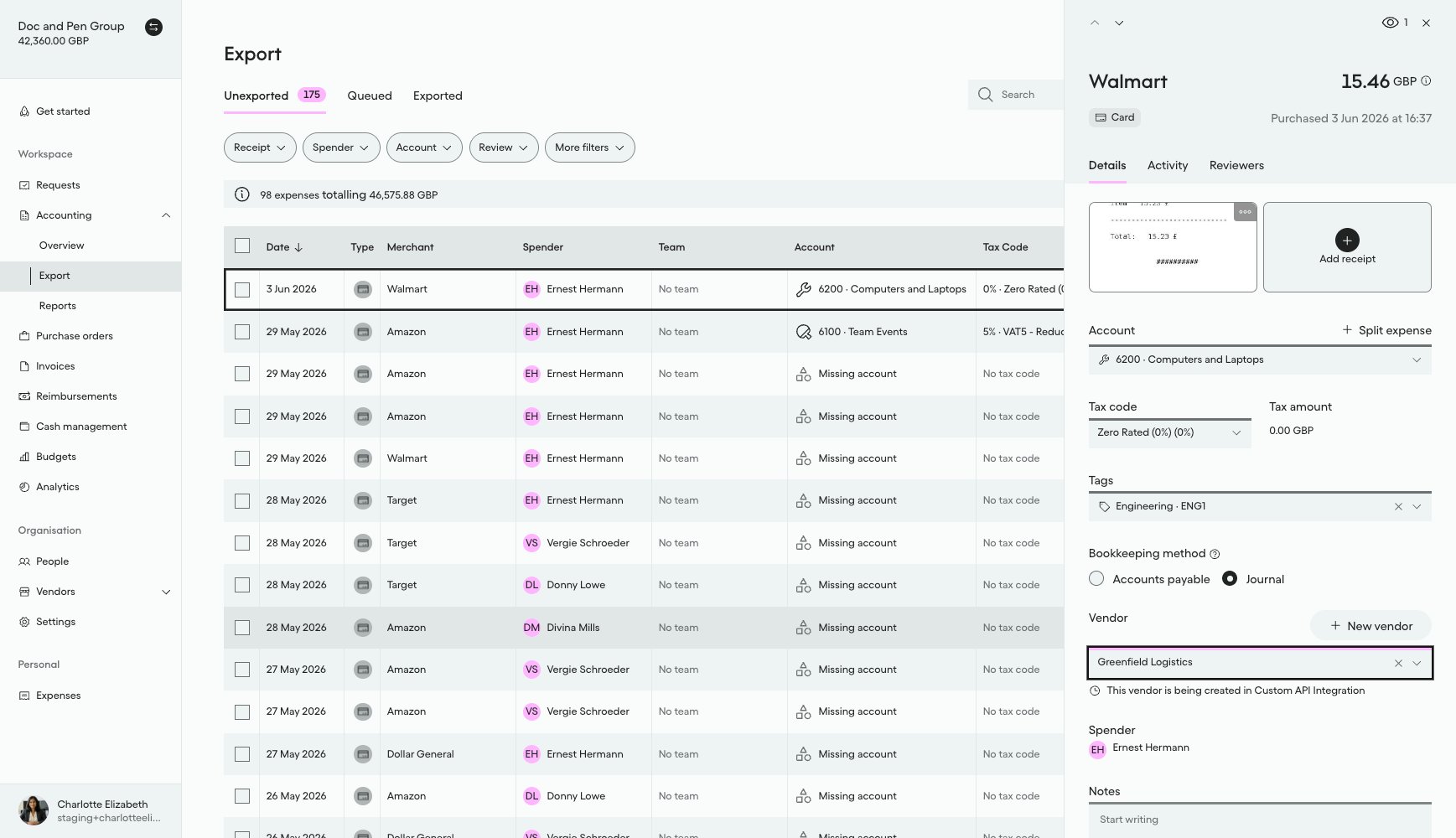
#### What it looks like in Pleo Web App

On the expense from [How to Create Vendors in Pleo](/docs/current/how-tos/accounting-integrations/vendors/how-to-create-vendors-in-pleo):

1. Select **Accounting** from the main left-hand navigation.
2. Select **Export** from the sub-menu.
3. Click on the same row to reopen the details panel for that expense.

"Greenfield Logistics" is selected on the Vendor field, with a note that the Vendor is still being created. This is the `DRAFT` state your integration needs to detect:

<div style={{ textAlign: "center" }}>
  <img src="https://mintcdn.com/pleo-61d4d38b/OQXz7YYPcGlsTpec/images/current/accounting-integrations/imports/vendor-sync/ui-vendors-active-activate-pending-greenfield-logistics.png?fit=max&auto=format&n=OQXz7YYPcGlsTpec&q=85&s=1c46d144c7611fb5e8c42d82f0ce157a" alt="Vendor field on an expense showing newly created Greenfield Logistics, not yet linked to the Accounting System" width="100%" style={{ display: "block", margin: "0 auto" }} data-path="images/current/accounting-integrations/imports/vendor-sync/ui-vendors-active-activate-pending-greenfield-logistics.png" />
</div>

***

## Handling Edge Cases

Neither detection path guarantees a `DRAFT` Vendor is seen only once, and there is no batching for Vendor Creation:

* **Webhook redelivery**: the webhook provider may redeliver the same `v1.vendor.created` event. Persist the `eventId` from the payload and skip any event you have already processed.
* **Overlapping polls, or webhook and polling running together**: a poll cycle can re-detect a `DRAFT` Vendor that is already being created/activated from a previous poll or from the webhook path, because the Vendor genuinely still has `state: DRAFT` until activation completes. Filtering on `state: DRAFT` does not prevent this. Before creating or activating a Vendor, check whether that Vendor id is already marked in-flight (for example, a persisted "processing" record keyed on the Pleo Vendor id), and skip it if so.
* **No batching**: process each detected `DRAFT` Vendor as its own independent item. A delay or failure creating one Vendor must not block any other.

<RememberCallout title="Remember">
  Detecting a `DRAFT` Vendor must not change its actual state in Pleo. This step is read-only.

  <br />

  <br />

  Only two actions ever change a Vendor's state: creating it in the AS, and calling `:activate`. Both happen in the next how-to, not here.

  <br />

  <br />

  If you need to track that a Vendor is already being processed (see the overlapping-polls case above), keep that as your own separate record. Don't represent it using the Vendor's real state field in Pleo.
</RememberCallout>

***

## Result

After completing this step:

* A `DRAFT` Vendor has been detected, either via webhook or polling
* The Vendor's `name`, `country`, `defaultCurrency`, `registrationNumber`, and `taxRegistrationNumber` are available
* The integration is ready to create the corresponding record in the AS

***

## What Comes Next?

<WhatComesNext href="/docs/current/how-tos/accounting-integrations/vendors/how-to-create-vendor-in-as">
  How to Create a Vendor in the AS
</WhatComesNext>

***

<div className="text-xs uppercase" style={{ fontVariant: 'small-caps' }}>
  this how-to is part of:
</div>

<div className="mt-4 flex flex-wrap gap-2">
  <a
    href="/docs/current/guides/vendor-creation-workflow-guide"
    className="inline-flex items-center rounded-full border border-gray-300 dark:border-gray-600
px-3 py-1 text-xs font-medium
bg-white dark:bg-[#1f262b] text-black dark:text-white
hover:bg-gray-100 dark:hover:bg-[#2b2f33]
transition-colors"
  >
    Vendor Creation Workflow Guide
  </a>
</div>

***

## Related Reading

* [How to Create Vendors in Pleo](/docs/current/how-tos/accounting-integrations/vendors/how-to-create-vendors-in-pleo)
* [Detect Draft Vendors Integration Design](/docs/current/integration-design/exports/vendors/integration-design-vendor-creation-detect-draft-vendors)
* [Platform Capabilities: Vendor Creation](/docs/current/platform/exports/vendors/vendor-creation-overview)
* [Configuring Webhooks During Integration](/reference/webhooks/overview-webhooks#configuring-webhooks-during-integration)

***