> ## Documentation Index
> Fetch the complete documentation index at: https://developers.pleo.io/llms.txt
> Use this file to discover all available pages before exploring further.
# Testing Pleo API using Postman
You can use [Postman](https://postman.com/), a popular HTTP client, to test your OAuth 2.0 configuration.
Depending on the method of authorization used by your app, you can configure Postman to use OAuth 2.0 or API keys.
## OAuth 2.0
Postman provides excellent support for request authorization using OAuth 2.0.
### Registration
When [registering an OAuth 2.0 client](/docs/client-registration), include Postman's redirect endpoint URIs in the list of redirect URIs for your client.
| Postman Variant | Redirect URI |
| :-------------- | :------------------------------------------- |
| Web-based | `https://oauth.pstmn.io/v1/browser-callback` |
| Desktop | `https://oauth.pstmn.io/v1/callback` |
### Configuration
On “Authorization” tab, in the “Auth Type”, select “OAuth 2.0” option.
Then, in “Configure New Token” section, provide following configuration options.
| Parameter | Configuration |
| :-------------------------- | :------------------------------------------------------------------------------------------------------------------------------------- |
| Grant type | Choose “Authorization Code (With PKCE)”. |
| Callback URL | One of Postman's redirect endpoint URIs, depending on the used variant. |
| Auth URL | `{AUTHORIZATION_SERVER_URL}/oauth/authorize` |
| Access Token URL | `{AUTHORIZATION_SERVER_URL}/oauth/token` |
| Client ID and Client Secret | Enter credentials of your client. |
| Code Challenge Method | Choose “SHA-256”. |
| Code Verifier | Leave blank, or provide a valid PKCE code verifier. |
| Scope | Enter space-delimited list of API scopes that is required for this request. A value of `test:test` can be used to test OAuth 2.0 flow. |
| Client Authentication | Choose “Send as Basic Auth Header”. |
Postman variables
We recommend using Postman environment variables to store the base URL of the authorization server and client credentials. This will allow you to quickly switch between staging and production versions of your client.
To run an OAuth 2.0 flow using Postman as a client, press “Get New Access Token” button. Postman will then open Pleo OAuth 2.0 authorization UI. After granting authorization, you will be redirected back to Postman, which will automatically run an access token request and obtain an access token.
Postman can also automatically obtain new access tokens to replace expired ones, using refresh tokens.
## API keys
Postman can easily be configured to access Pleo APIs using API keys.
### Configuration
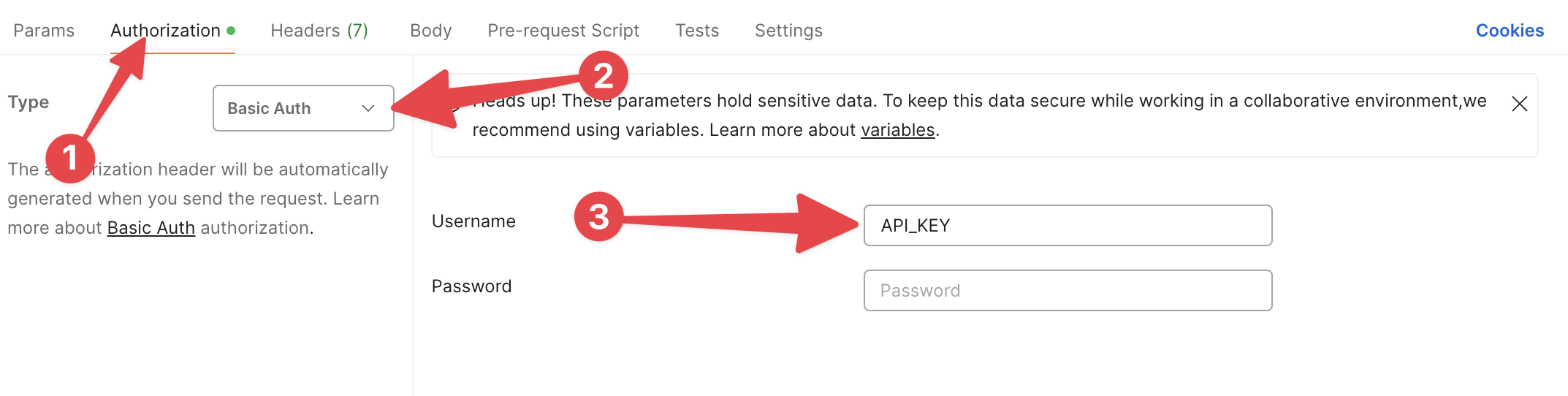
1. Switch to "Authorization tab".
2. Select "Basic Auth" in the "Type" dropdown menu.
3. Provide your API key as the "Username". Leave "Password" field blank.
 Postman variables
We recommend storing your API keys as Postman environment variables.
Postman variables
We recommend storing your API keys as Postman environment variables.