> ## Documentation Index
> Fetch the complete documentation index at: https://developers.pleo.io/llms.txt
> Use this file to discover all available pages before exploring further.

# Postman Collection

export const NoteCallout = ({title, children}) => <div className="callout-box callout-note">
    <div className="callout-row">
      <span className="callout-icon">
        <svg width="22" height="22" xmlns="http://www.w3.org/2000/svg" viewBox="0 0 256 256" fill="currentColor"><path d="M208,104a79.86,79.86,0,0,1-30.59,62.92A24.29,24.29,0,0,0,168,186v6a8,8,0,0,1-8,8H96a8,8,0,0,1-8-8v-6a24.11,24.11,0,0,0-9.3-19A79.87,79.87,0,0,1,48,104.45C47.76,61.09,82.72,25,126.07,24A80,80,0,0,1,208,104Z" opacity="0.2" /><path d="M176,232a8,8,0,0,1-8,8H88a8,8,0,0,1,0-16h80A8,8,0,0,1,176,232Zm40-128a87.55,87.55,0,0,1-33.64,69.21A16.24,16.24,0,0,0,176,186v6a16,16,0,0,1-16,16H96a16,16,0,0,1-16-16v-6a16,16,0,0,0-6.23-12.66A87.59,87.59,0,0,1,40,104.49C39.74,56.83,78.26,17.14,125.88,16A88,88,0,0,1,216,104Zm-16,0a72,72,0,0,0-73.74-72c-39,.92-70.47,33.39-70.26,72.39a71.65,71.65,0,0,0,27.64,56.3A32,32,0,0,1,96,186v6h64v-6a32.15,32.15,0,0,1,12.47-25.35A71.65,71.65,0,0,0,200,104Zm-16.11-9.34a57.6,57.6,0,0,0-46.56-46.55,8,8,0,0,0-2.66,15.78c16.57,2.79,30.63,16.85,33.44,33.45A8,8,0,0,0,176,104a9,9,0,0,0,1.35-.11A8,8,0,0,0,183.89,94.66Z" /></svg>
      </span>
      <div>
        {title && <div className="callout-title">
            {title}
          </div>}
        <div className="callout-body">
          {children}
        </div>
      </div>
    </div>
  </div>;

<NoteCallout title="Note">
  This page refers to the Legacy API which is deprecated
</NoteCallout>

## Swagger

Open API 3.0.0 specification for our APIs hosted [here](https://api.pleo.io/rest/v3/swagger.json)

You can use this specification to generate client libraries to interact with our REST API in your language of choice or swagger editor (eg [this](https://editor.swagger.io/)) to test our APIs.

You can also use this definition to create a postman collection for testing purposes as follows:

1. Click [this](https://api.pleo.io/rest/v3/swagger.json) link. This will open the swagger JSON file in the browser.
2. Copy the URL and import it into Postman as follows: <br />
   a. Open Postman <br />
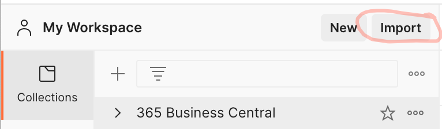
   b. In your workspace click the Import button:
<Frame>
  <img src="https://mintcdn.com/pleo-61d4d38b/UuiilCOMmC9ytc__/images/reference/6ad5ca7-Picture1.png?fit=max&auto=format&n=UuiilCOMmC9ytc__&q=85&s=553bcfe8d2c4e22dcceeb224b16f28b1" alt="" width="442" height="130" data-path="images/reference/6ad5ca7-Picture1.png" />
</Frame>

c. Select the Link tab and paste the swagger json URL into the URL field and click the Continue button:

<Frame>
  <img src="https://mintcdn.com/pleo-61d4d38b/UuiilCOMmC9ytc__/images/reference/282996d-Picture2.png?fit=max&auto=format&n=UuiilCOMmC9ytc__&q=85&s=31915bc3a93ee9bc33e881d835f45442" alt="" width="538" height="168" data-path="images/reference/282996d-Picture2.png" />
</Frame>

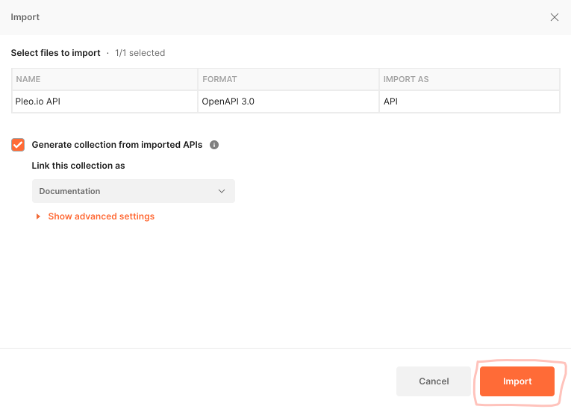
d. Click the Import button:

<Frame>
  <img src="https://mintcdn.com/pleo-61d4d38b/UuiilCOMmC9ytc__/images/reference/3468fa0-Picture3.png?fit=max&auto=format&n=UuiilCOMmC9ytc__&q=85&s=c6a8d67bd32628eacfe21a18963e04c6" alt="" width="572" height="412" data-path="images/reference/3468fa0-Picture3.png" />
</Frame>

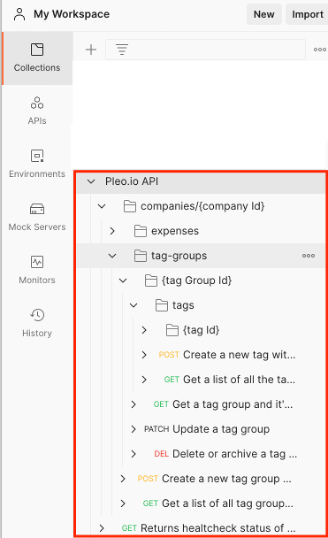
e. The API will be imported into your postman collection. Happy requesting!!!
<Frame>
  <img src="https://mintcdn.com/pleo-61d4d38b/UuiilCOMmC9ytc__/images/reference/4136212-Picture4.png?fit=max&auto=format&n=UuiilCOMmC9ytc__&q=85&s=e8a63a790e5f3e847c22a70dbaae388f" alt="" width="328" height="538" data-path="images/reference/4136212-Picture4.png" />
</Frame>