

Prerequisites
Before you begin:- You have completed How to Fetch and Match Vendors and have an AS vendor with no matching Pleo Vendor
- Your integration is authenticated using one of the supported authentication methods
- Your integration can call Pleo’s Vendors API endpoints
Scenario
This how-to continues from the How to Fetch and Match Vendors scenario: “Bright Office Ltd” (EXT-003) is active in the AS with no matching Pleo Vendor.Steps
1. Create Vendors for New AS Entries
API Endpoint: POST/v1/vendors
If an AS vendor has no matching Pleo Vendor, create a new Vendor. Providing externalId on creation sets the Vendor’s state to ACTIVE automatically.
Example Pseudo:
Example Request
- OAuth 2.0
- API Key
Example Response
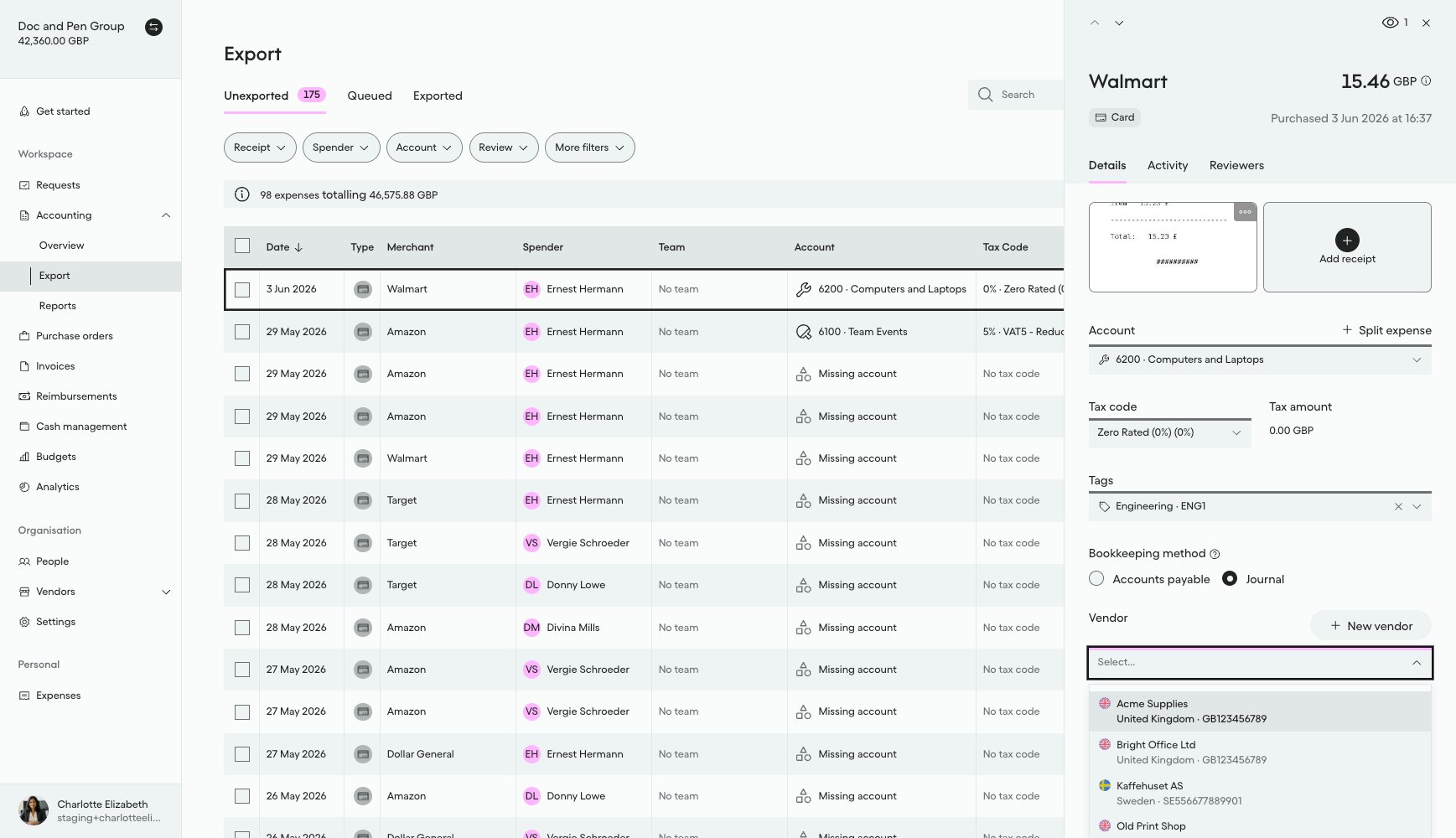
What it looks like in Pleo Web App
- Select Accounting from the main left-hand navigation.
- Select Export from the sub-menu.
- Click on a row to open the details panel for that expense.
- Select the Vendor drop-down menu to view active Vendors.
ACTIVE.
Handling Edge Cases
The following apply to every write in this suite, Create, Unarchive, Update, and Archive alike, not just this page. The other how-tos link back here rather than repeating them.- Create collides with an existing
externalId:externalIdis unique per company, so this call returns409 CONFLICT_EXCEPTIONif a Vendor with thatexternalIdalready exists, active or archived. This should not happen for a vendor that went through matching correctly, since that step already checks both states, so treat it as a sign the prior fetch-and-match step missed something (for example, a race condition with a concurrent sync run). Look up the existing Vendor by thatexternalIdand unarchive or update it instead of retrying Create, and log the anomaly for investigation. - Partial write failure: If one write (create, update, unarchive, or archive) fails partway through the batch, do not abort the entire run. Continue processing the remaining vendors, and log or report the specific vendor(s) that failed so they can be retried on the next sync cycle.
- Unknown write outcome: If a create, update, unarchive, or archive request times out or the response is lost after the request was sent, its outcome is unknown, not necessarily a failure. Do not blindly re-send the same write on this run, since it may have already applied. Instead, re-fetch that specific Vendor’s current Pleo state before deciding: if it already matches the intended target state, treat the write as a no-op success and move on; if it does not, retry the write on the next sync cycle rather than immediately, so a slow-but-successful original request has time to be reflected before you re-check.
Result
What Comes Next?
this how-to is part of:
Related Reading
- How to Fetch and Match Vendors
- How to Unarchive Vendors
- Sync Vendors Integration Design
- Vendor Sync Data Mapping
- Platform Capabilities: Vendor Sync