This how-to covers the write operations for Tax Sync: creating new Tax Codes, updating or unarchiving existing Tax Codes, and archiving Tax Codes that are no longer active in the Accounting System. Run this after How to Fetch and Match Tax Codes, which covers fetching and matching tax codes from both systems.

Prerequisites

Before you begin:

Scenario

This how-to continues from the How to Fetch and Match Tax Codes scenario. After matching, the following actions are required:
AS Tax CodePleo Tax CodeAction
VAT20 - Standard (20%)VAT20 - Standard (20%)No action
VAT5 - Reduced (5%)VAT5 - Reduced (5%)Unarchive
VAT0 - Zero Rated (0%)Create
REV - Reverse ChargeREV - Reverse ChargeUpdate
EXEMPT - ExemptArchive

Steps

1. Create Tax Codes for New AS Entries

API Endpoint: POST /v0/tax-codes If an AS tax code has no matching Pleo Tax Code, create a new Tax Code. Example Pseudo:
if matchedTaxCode is null:
    newTaxCode.code     = taxCode.code
    newTaxCode.name     = taxCode.name
    newTaxCode.rate     = taxCode.rate
    newTaxCode.type     = mapType(taxCode)   // "reverse" or "inclusive"
    newTaxCode.archived = false
    POST newTaxCode to Pleo

Type Mapping

AS Tax CodePleo type
Reverse taxreverse
All other taxesinclusive
The Pleo Web App labels these Standard and Reverse; see Tax Sync Data Mapping for the full naming note.

Example Request

curl -X POST "https://external.staging.pleo.io/v0/tax-codes" \
  -H "Authorization: Bearer <access_token>" \
  -H "Content-Type: application/json" \
  -d '{
        "companyId": "12abc3d4-e567-890e-1234-abc56e78fabc",
        "code": "VAT0 - Zero Rated (0%)",
        "name": "VAT0 - Zero Rated (0%)",
        "rate": 0.00,
        "type": "inclusive",
        "archived": false
      }'

Example Response

{
  "data": {
    "id": "4386a696-20d3-47fe-a230-9516fc93222c",
    "companyId": "12abc3d4-e567-890e-1234-abc56e78fabc",
    "name": "VAT0 - Zero Rated (0%)",
    "code": "VAT0 - Zero Rated (0%)",
    "type": "inclusive",
    "rate": 0E-16,
    "accountingIntegrationSystem": "pleo",
    "archived": false,
    "createdAt": "2026-07-07T10:11:25.715331584Z",
    "updatedAt": "2026-07-07T10:11:25.715331584Z"
  }
}

What it looks like in Pleo Web App

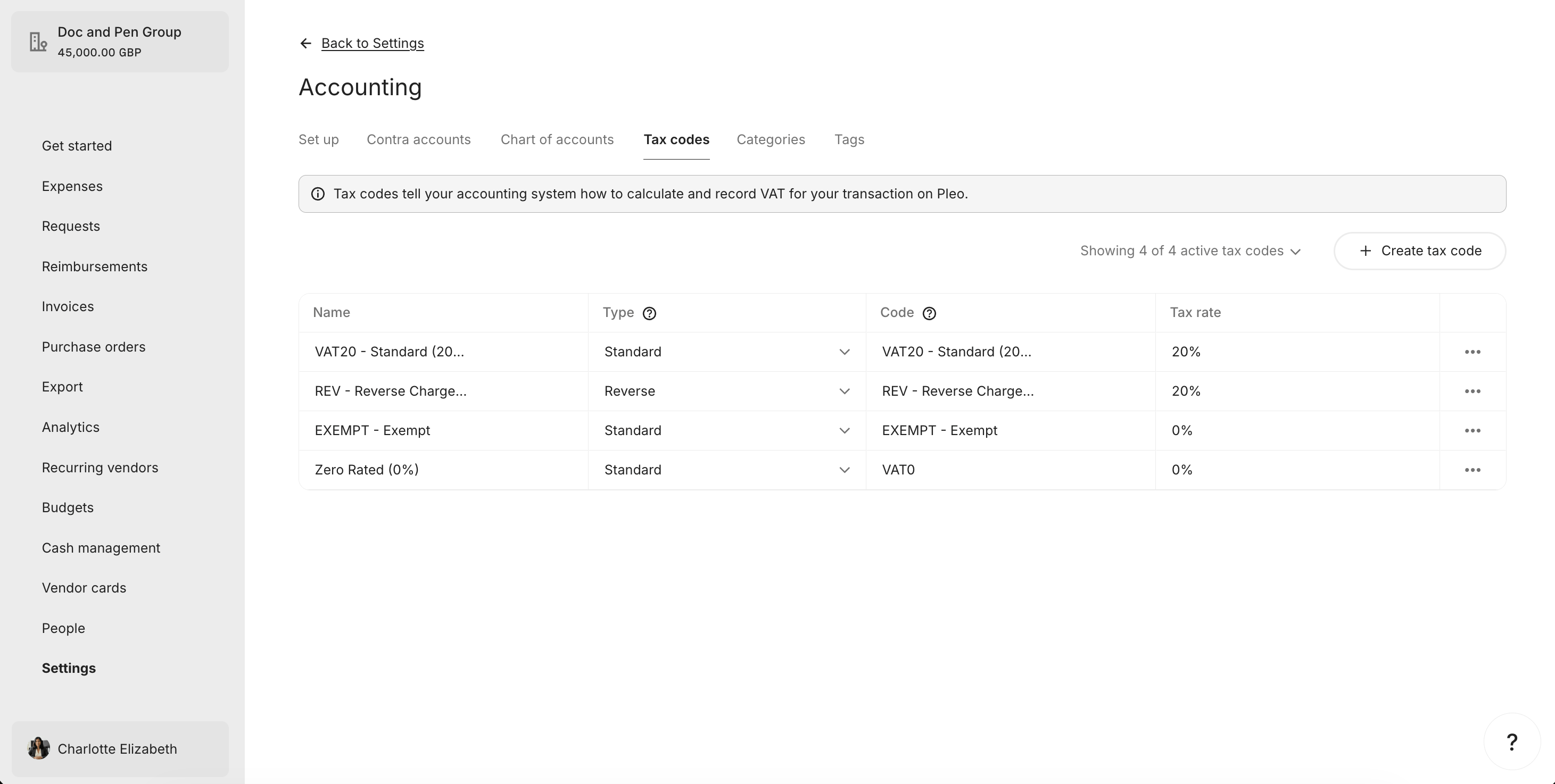
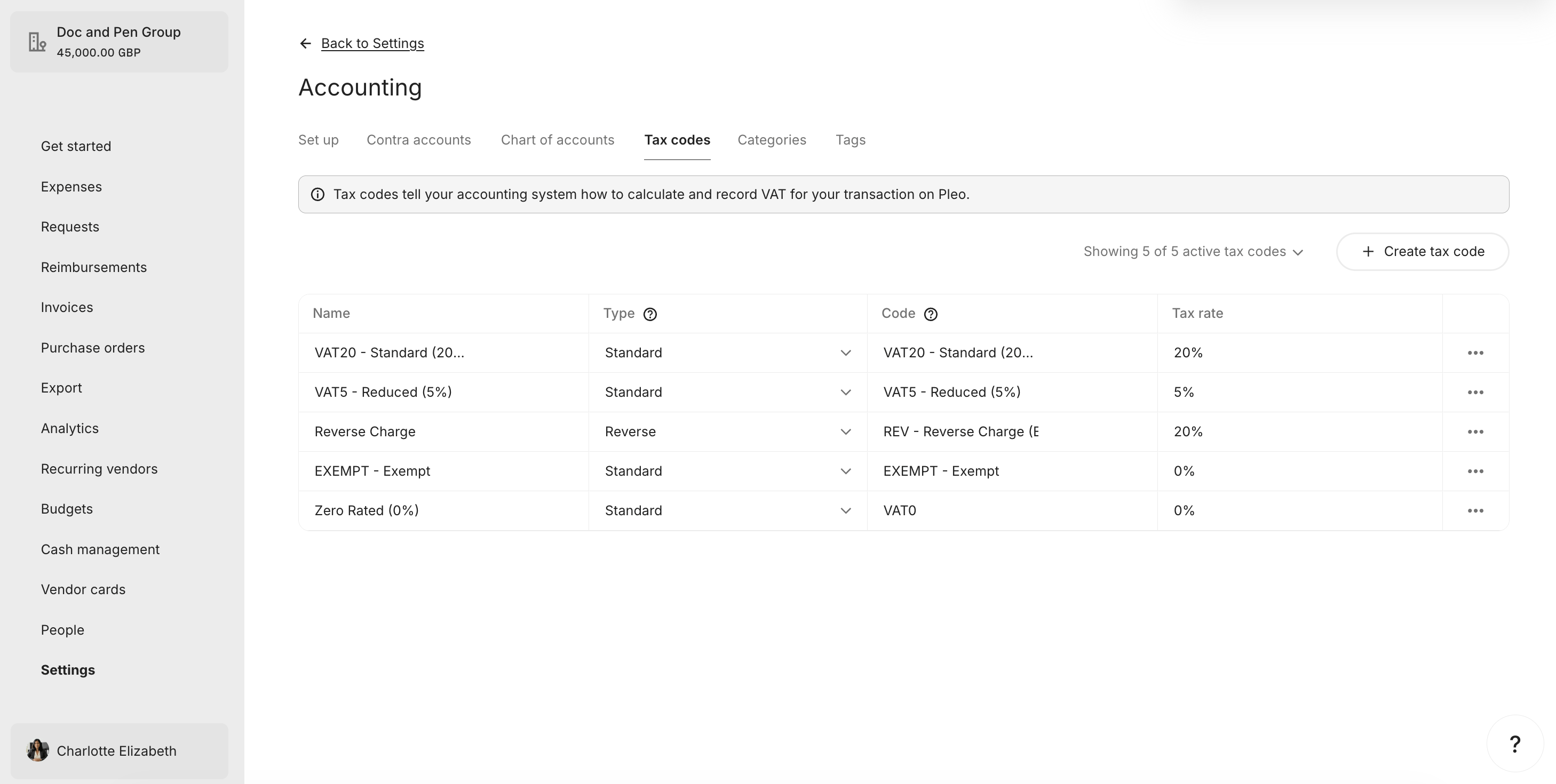
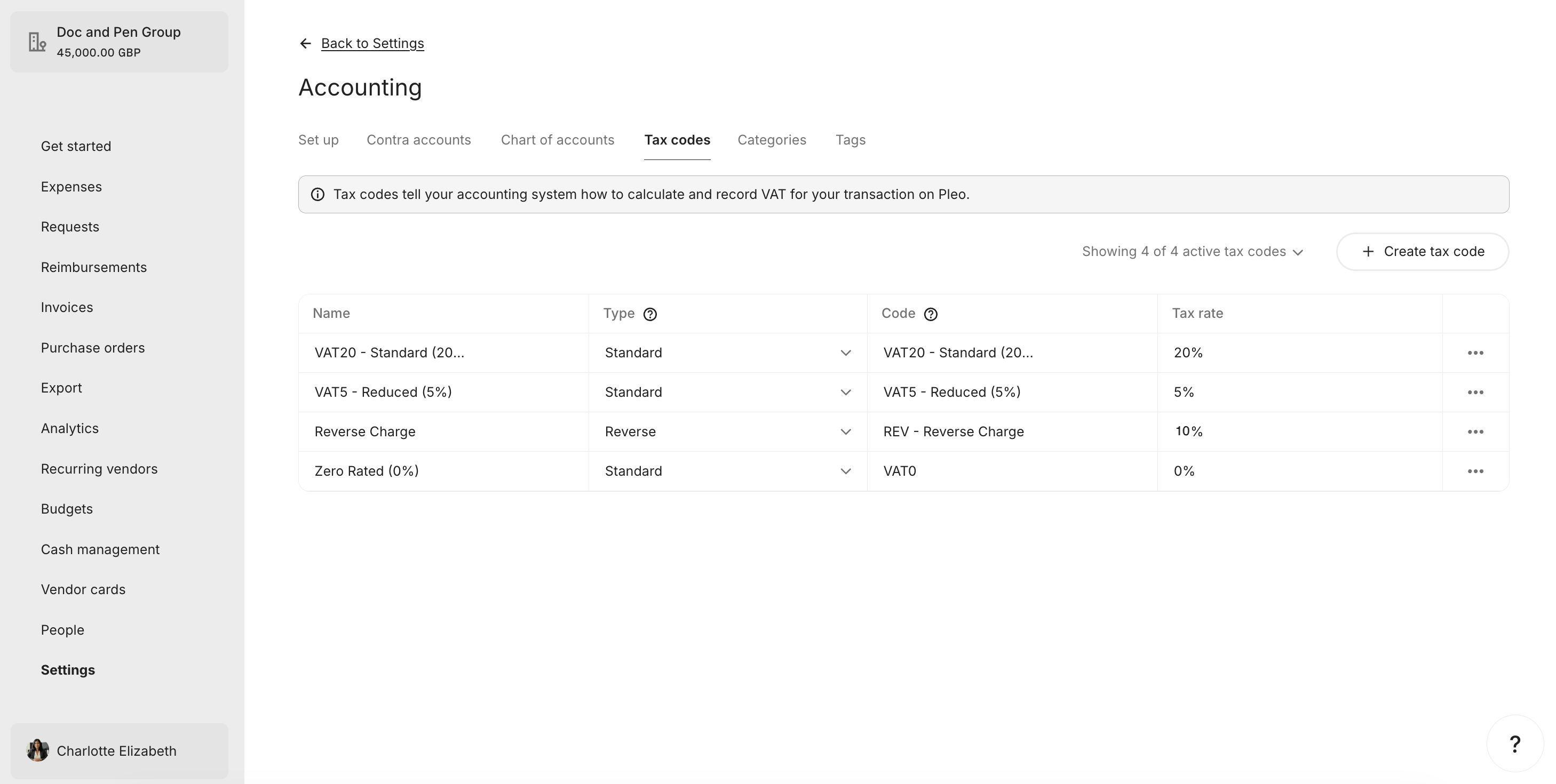
Active Tax Codes Tab with Zero Rated added

2. Unarchive or Update Existing Tax Codes

API Endpoint: PUT /v0/tax-codes/{taxCodeId} If a matching Tax Code is found:
  • AS tax code is active, Pleo Tax Code is archived: Unarchive by setting archived: false and update name, rate, and type if they differ.
  • AS tax code is active, Pleo Tax Code details differ: Update the Tax Code to match the AS.
  • AS tax code is active, Pleo Tax Code details match: No action required.
Example Pseudo:
if matchedTaxCode.archived == true:
    matchedTaxCode.archived = false
    matchedTaxCode.name     = taxCode.name
    matchedTaxCode.rate     = taxCode.rate
    matchedTaxCode.type     = mapType(taxCode)
    PUT matchedTaxCode to Pleo

else if detailsDiffer(matchedTaxCode, taxCode):
    matchedTaxCode.name = taxCode.name
    matchedTaxCode.rate = taxCode.rate
    matchedTaxCode.type = mapType(taxCode)
    PUT matchedTaxCode to Pleo

Unarchive

Example Request

The “VAT5 - Reduced (5%)” Tax Code is unarchived in this example.
curl -X PUT "https://external.staging.pleo.io/v0/tax-codes/c3d4e5f6-g789-012g-3456-cde78g90habc" \
  -H "Authorization: Bearer <access_token>" \
  -H "Content-Type: application/json" \
  -d '{
        "companyId": "12abc3d4-e567-890e-1234-abc56e78fabc",
        "code": "VAT5 - Reduced (5%)",
        "name": "VAT5 - Reduced (5%)",
        "rate": 0.05,
        "type": "inclusive",
        "archived": false
      }'

Example Response

{
  "data": {
    "id": "c3d4e5f6-g789-012g-3456-cde78g90habc",
    "companyId": "12abc3d4-e567-890e-1234-abc56e78fabc",
    "code": "VAT5 - Reduced (5%)",
    "name": "VAT5 - Reduced (5%)",
    "rate": 0.0500000000000000,
    "type": "inclusive",
    "archived": false,
    "createdAt": "2026-07-07T08:47:59.430364Z",
    "updatedAt": "2026-07-08T10:06:51.105888Z"
  }
}

What it looks like in Pleo Web App

Active Tax Codes Tab with VAT5 unarchived

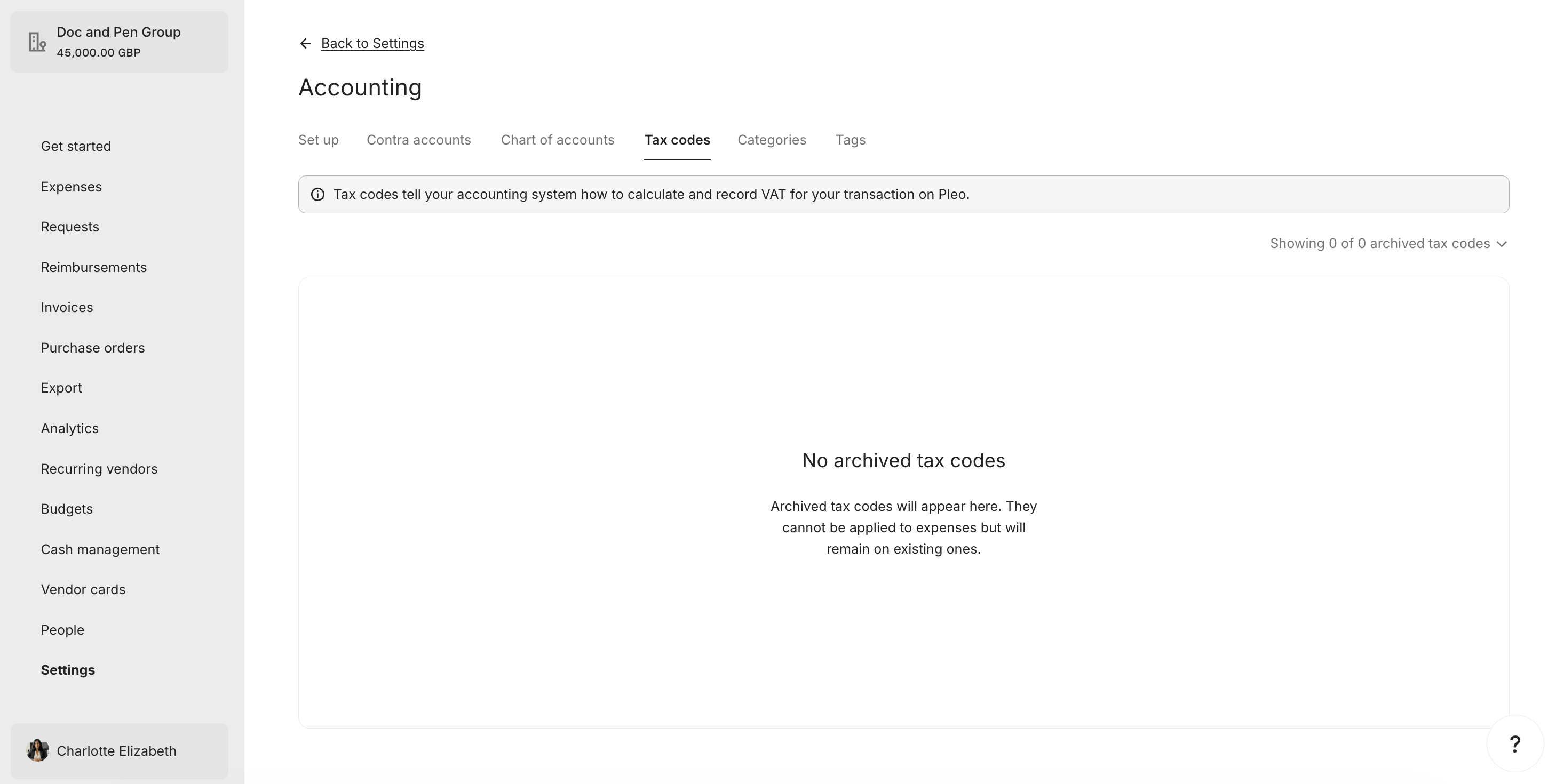
Archived Tax Codes Tab now empty

Update

Example Request

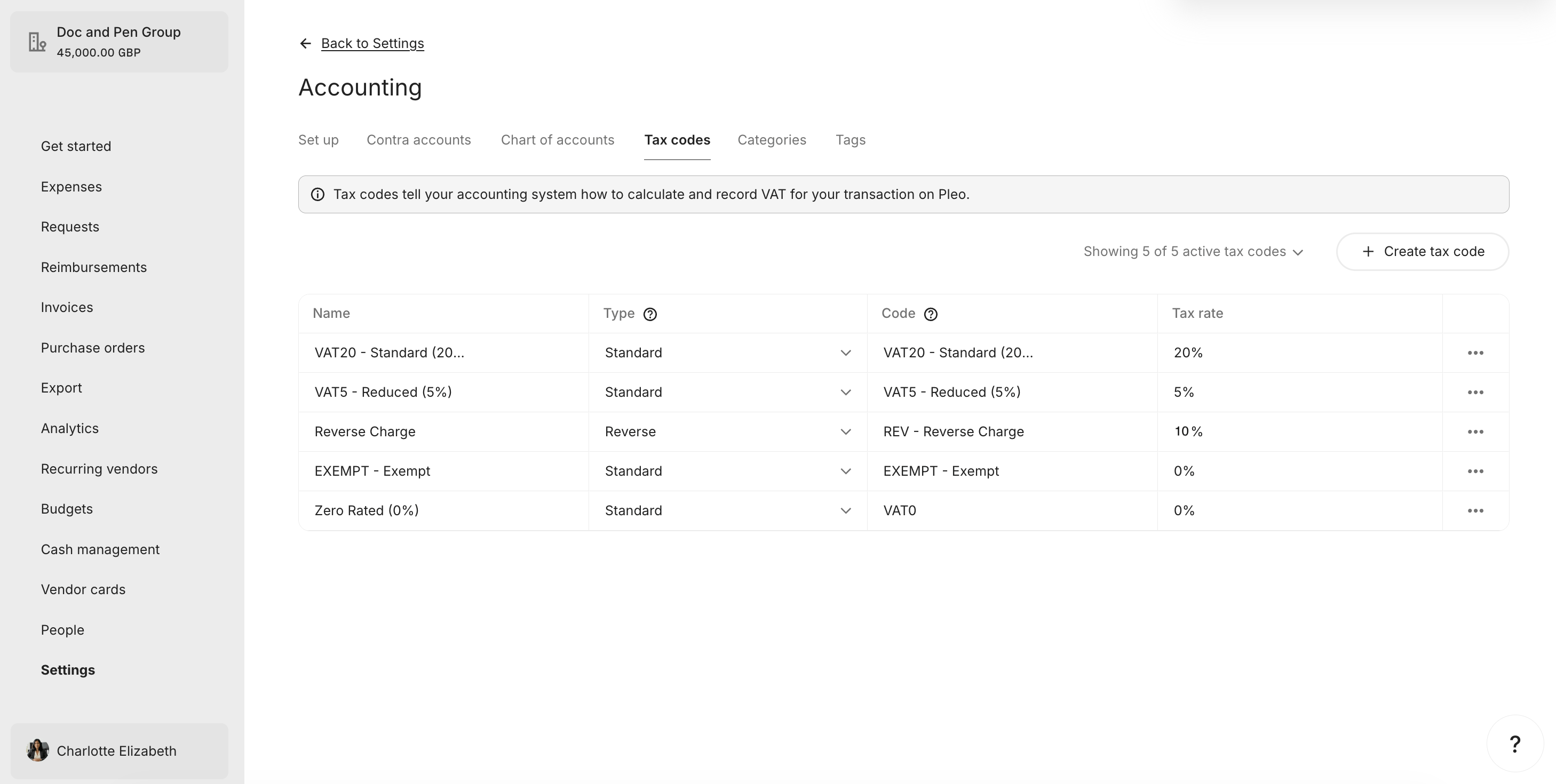
The “REV - Reverse Charge” Tax Code’s rate is updated from 20% to match the AS rate of 10% in this example.
curl -X PUT "https://external.staging.pleo.io/v0/tax-codes/b2c3d4e5-f678-901f-2345-bcd67f89gabc" \
  -H "Authorization: Bearer <access_token>" \
  -H "Content-Type: application/json" \
  -d '{
        "companyId": "12abc3d4-e567-890e-1234-abc56e78fabc",
        "code": "REV - Reverse Charge",
        "name": "REV - Reverse Charge",
        "rate": 0.10,
        "type": "reverse",
        "archived": false
      }'

Example Response

{
  "data": {
    "id": "b2c3d4e5-f678-901f-2345-bcd67f89gabc",
    "companyId": "12abc3d4-e567-890e-1234-abc56e78fabc",
    "name": "REV - Reverse Charge",
    "code": "REV - Reverse Charge",
    "type": "reverse",
    "rate": 0.1000000000000000,
    "accountingIntegrationSystem": "pleo",
    "archived": false,
    "createdAt": "2026-07-07T08:48:52.799351Z",
    "updatedAt": "2026-07-08T09:20:10.215202Z"
  }
}

What it looks like in Pleo Web App

Active Tax Codes Tab with Reverse Charge code updated

3. Archive Tax Codes with No Matching AS Entry

API Endpoint: PUT /v0/tax-codes/{taxCodeId} If a Pleo Tax Code is active but its corresponding AS tax code is no longer active (or does not exist), archive the Tax Code. Do not delete Tax Codes. Archiving is non-destructive and reversible. Example Pseudo:
relevantASCodes = relevantASTaxCodes.map(tc => tc.code.toLowerCase())

for taxCode in pleoTaxCodes where archived == false:
    if taxCode.code.toLowerCase() not in relevantASCodes:
        taxCode.archived = true
        PUT taxCode to Pleo

Example Request

curl -X PUT "https://external.staging.pleo.io/v0/tax-codes/a1b2c3d4-e567-890e-1234-abc56e78fabc" \
  -H "Authorization: Bearer <access_token>" \
  -H "Content-Type: application/json" \
  -d '{
        "companyId": "12abc3d4-e567-890e-1234-abc56e78fabc",
        "code": "EXEMPT - Exempt",
        "name": "EXEMPT - Exempt",
        "rate": 0.00,
        "type": "inclusive",
        "archived": true
      }'

Example Response

{
  "data": {
    "id": "a1b2c3d4-e567-890e-1234-abc56e78fabc",
    "companyId": "12abc3d4-e567-890e-1234-abc56e78fabc",
    "name": "EXEMPT - Exempt",
    "code": "EXEMPT - Exempt",
    "type": "inclusive",
    "rate": 0E-16,
    "accountingIntegrationSystem": "pleo",
    "archived": true,
    "createdAt": "2026-07-07T08:49:26.679397Z",
    "updatedAt": "2026-07-08T10:18:54.989629Z"
  }
}

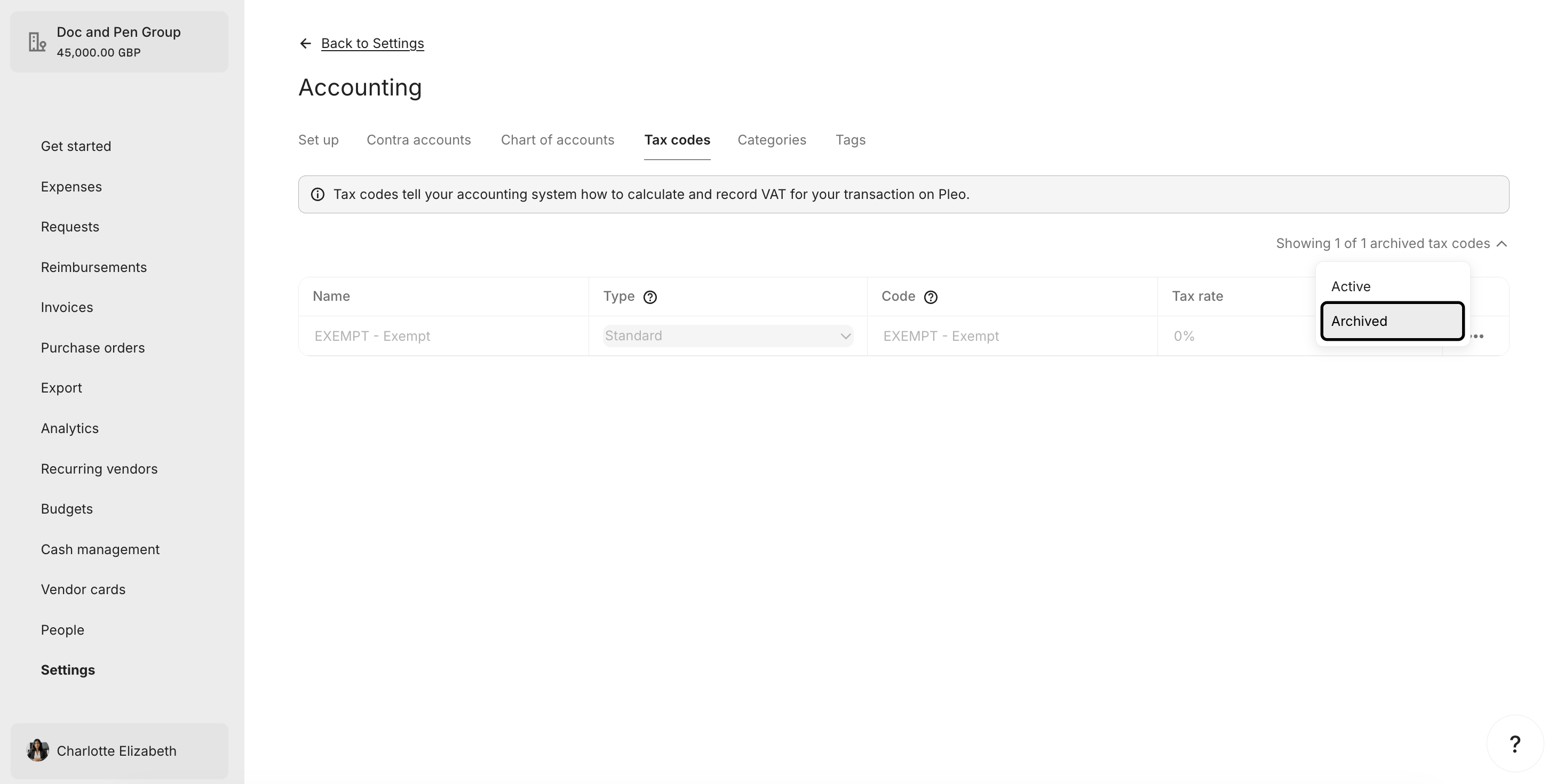
What it looks like in Pleo Web App

Active Tax Codes Tab without Exempt

Archived Tax Codes Tab showing Exempt as archived

4. Handle Duplicate Codes in Pleo

API Endpoint: PUT /v0/tax-codes/{taxCodeId} If two or more Pleo Tax Codes share the same code, resolve the conflict before completing the sync:
  • Retain the Tax Code whose rate matches the rate from the corresponding AS tax code.
  • Archive the duplicate using archived: true.
  • If all duplicates match the rate, retain one and archive the rest.
Example Pseudo:
for each group of pleoTaxCodes with the same code:
    if group.size > 1:
        asTaxCode = relevantASTaxCodes.find(tc => tc.code == group.code)
        preferred = group.find(tc => tc.rate == asTaxCode.rate) ?? group.first()
        for duplicate in group where duplicate.id != preferred.id:
            duplicate.archived = true
            PUT duplicate to Pleo

Result

The table below recaps what happened to each Tax Code across all steps.
Tax CodeAS StatusPleo State BeforeActionFinal Pleo State
VAT20 - Standard (20%)ActiveActive, matchesNo actionActive
VAT5 - Reduced (5%)ActiveArchivedUnarchivedActive
VAT0 - Zero Rated (0%)ActiveDoes not existCreatedActive
REV - Reverse ChargeActiveActive, rate differedUpdatedActive
EXEMPT - ExemptNot in ASActiveArchivedArchived
Pleo now reflects the current active, relevant tax codes from the AS.
Tax CodeFinal State in PleoIn AS?Aligned?
VAT20 - Standard (20%)ActiveYes✓ Yes
VAT5 - Reduced (5%)ActiveYes✓ Yes
VAT0 - Zero Rated (0%)ActiveYes✓ Yes
REV - Reverse ChargeActiveYes✓ Yes
EXEMPT - ExemptArchivedNo✓ Yes

What Comes Next?


this how-to is part of: