

MISSING_CONTRA_ACCOUNTS error occurs when calling /v3/export-items and how to resolve it.
The Error
When callingGET /v3/export-items, you may receive the following response:
Why This Happens
Export API v3 requires a contra account to be configured for each entity’s default currency. The default currency is determined by the region where the company entity is registered, for example, GBP for a UK entity or DKK for a Danish entity. In a multi-entity setup, each entity has its own default currency, and a contra account must be configured for each one. If any entity’s default currency does not have a contra account mapped, calls to/v3/export-items will fail with
this error.
How to Resolve It
Add a Contra Account
- Click Settings from the main left-hand menu
- Click Accounting
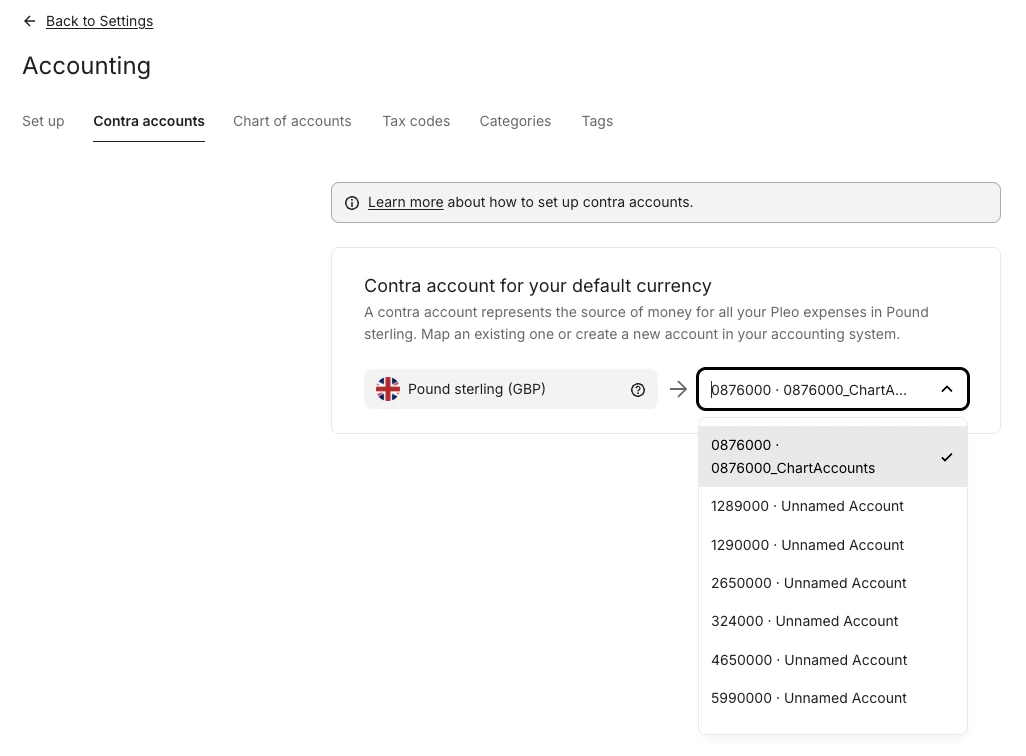
- Click the Contra accounts tab
- Select a Contra account for your default currency from the drop-down menu
Contra Accounts tab not visible?
If you do not see the Contra Accounts tab, contact Pleo Support to have it enabled for your account.After Resolving
Once contra accounts are configured for the default currency, calls toGET /v3/export-items will return the full export item payload as expected.